Home / Blog / Agents & Automation
A Local AI Agent That Talks, Codes, and Works Alone
 Gary Bramnik
7 September 2026 · 9 min read

Contents
- Hermes, the agent that lives on your machine, not on OpenAI's
- Installing Hermes in five minutes
- The real twist: having it build its own interface
- Giving the agent a real voice (and knowing when to shut it up)
- Mission control: seeing what the agent is doing without reading anything
- The proof: a full day of research in twenty minutes
- Why this is a product, not just a weekend build
- What actually changes
- FAQ: Understanding Hermes Agent and Its Features
- What I'd build with this as part of Direction IA Externalisée
It's 7am. My AI agent has been running for two hours already.
While I made coffee, it scanned ten YouTube channels in the AI and automation space, pulled thirty-four transcripts, and wrote a several-page report on what actually makes content work. In another tab, at the same time, it was finishing a small Space Invaders style game I'd asked for, just to test whether it could multitask.
I didn't type anything. I just talked to it.
It runs on my own computer, for free, without depending on someone else's cloud. Here's how I built it, step by step, and why it's exactly the kind of system an agency charges five figures to set up.
Hermes, the agent that lives on your machine, not on OpenAI's
The engine behind all of this is called Hermes Agent. It's an open-source project under the MIT license, built by Nous Research, that runs locally on your own machine. Not on a third-party server, not inside a SaaS subscription.
The difference with a regular chatbot comes down to one word: it acts. A chat answers a question. Hermes searches the web, drives a browser, writes and runs its own code, opens and edits your files, and can do all of that on its own, on a schedule, while you're somewhere else. A competitive sweep every morning, a backup every night, a report waiting for you when you wake up.
It also keeps memory across sessions, picks up new skills as it's used, and reaches you wherever you already are: Telegram, WhatsApp, Slack, email.
The catch: by default, you talk to it by typing in a terminal or a text chat. That's fine until you picture the alternative. Talking to it out loud, hearing it answer back in a real voice, and watching its tasks run on a screen in front of you.
That's exactly what I built next: a voice command dashboard.
Installing Hermes in five minutes
On the installation side, on macOS, Windows, or Linux via WSL2, a single terminal command downloads and installs every dependency. The official site (hermes-agent.nousresearch.com) also offers a one-click desktop app if you'd rather skip the terminal entirely.
On first launch, two options show up:
- Quick setup: you use Nous Research's own built-in AI providers, ready to go.
- Full setup: you plug in your own API keys and pick your provider (OpenAI, OpenRouter, xAI Grok, and a dozen others).
The choice that changes everything happens when you configure the provider. Instead of paying the OpenAI API per token, you can authenticate through OpenAI Codex using the ChatGPT subscription you're already paying for. Result: weeks of heavy usage on GPT-5.5 without ever hitting a quota, and without a single extra euro on an API bill.
Once connected, you pick a messaging channel if you want one (Telegram, for instance, or you skip that step entirely if you're planning to build a dedicated interface), enable whichever tools you need (Firecrawl for web scraping, image generation and analysis), and Hermes is ready. A plain hermes in the terminal opens the chat.
The real twist: having it build its own interface
This is where it gets interesting. Instead of coding a dashboard by hand, I pasted a single prompt into the agent (provided in the project's documentation) describing exactly what I wanted: a local interface with a command-center look, wired to Hermes's own server, with voice input and output, quick-command buttons, an approval system, and a mission control panel.
Eight minutes later, the first version was running. One server restart to pick up the new files, and the interface loaded in the browser.
It wasn't perfect on the first try. Some spacing was off, a button was misplaced. Fixing it required zero lines of code. You go back into the chat and describe what's wrong. "The panel is too big," "this button doesn't respond." The agent reads its own files, fixes them, and reloads the page by itself.
The job changed shape entirely. You stop coding the tool and start describing it and correcting it.
Giving the agent a real voice (and knowing when to shut it up)
With no extra setup, voice synthesis runs through the browser: a decent robotic voice, nothing more. For a real voice, you need to wire in ElevenLabs.
The free plan is enough to get started, but the quotas run out fast the moment you actually use it. You'll want a paid plan if the agent runs all day.
In practice: in the ElevenLabs dashboard, under API, you create a key with four permissions enabled (text-to-speech, speech-to-speech, speech-to-text, voices). That key goes into a local .env file, the secrets vault the browser reads from on every server call without ever exposing it in visible code. Then you pick a voice from the ElevenLabs library, copy its ID, and paste it into the same file.
The problem that jumps out immediately: Hermes sometimes answers in two-hundred-word blocks. Sending the whole text to ElevenLabs at once, waiting for the full audio file, then playing it back completely kills the feel of a living assistant. Several seconds of silence before the first syllable.
The fix comes down to one sentence: split the response into small chunks, send each chunk to ElevenLabs as soon as it's ready, and stream the audio back as it arrives. The first syllable goes out before the last sentence of text is even fully written.
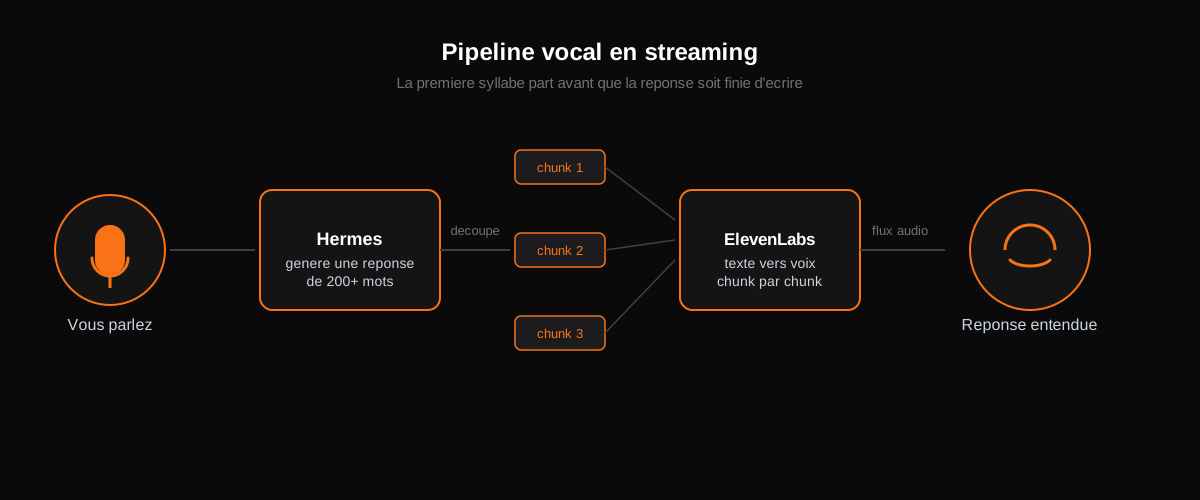
That chunking creates an opposite problem. If you ask the agent to write a full blog post, it will want to read it out loud, start to finish. Nobody wants to stand in front of their screen listening to eight hundred words. Hence a "kill voice" button on the interface, which instantly stops all audio generation and playback in progress. You get confirmation the task is done without having to hear the whole novel.
Mission control: seeing what the agent is doing without reading anything
The last layer, the one that turns a talking gadget into an actual command center, is the mission panel.
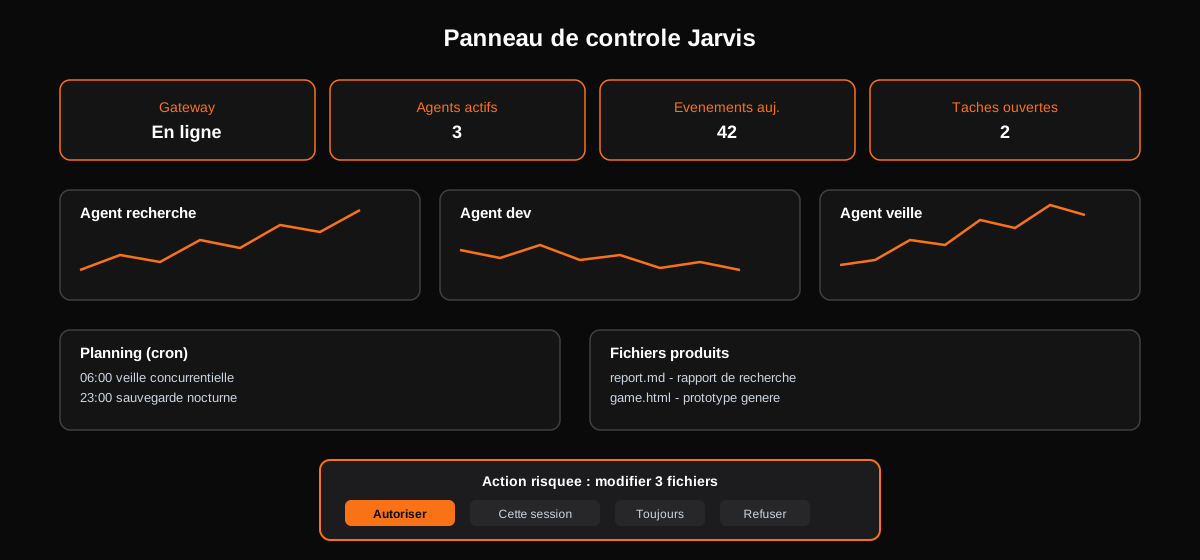
At the top, overview cards: is the server healthy, how many agent profiles are active, how many events today, how many open tasks. Next to them, one card per agent with a small activity graph, so you can spot at a glance which one has been busiest. A car dashboard: you don't read it, you just glance at it.
Quick commands let you drive the agent without typing a full sentence:
- a personality command changes the agent's tone and behavior
- a background-task command hands it a new job without interrupting the current one
- a goal command kicks off a long, complex mission, the one that produced the research report
A schedule card lists the recurring automations, and a content browser shows the files the agent has already produced, openable in one click straight from the dashboard.
The part that makes this safe to point at a real business: every risky action (editing a file, sending a message) triggers a confirmation prompt. Allow once, allow for this session, always allow, or deny. Nothing dangerous happens without an explicit yes.
The proof: a full day of research in twenty minutes
The most convincing test is still the background mission launched by voice command: find the best YouTube channels in the AI and automation space, pull their five best videos each, transcribe them, and extract what actually makes them work.
Twenty minutes later, without me touching anything: fifty videos reviewed, ten creators covered, thirty-four transcripts pulled, and a full report with methodology, recurring patterns, and an actionable summary. That kind of research work, done by hand, is the best part of a working day, gone.
Why this is a product, not just a weekend build
What most people who put together a system like this for fun miss is that it's sellable as it stands.
Look at who's struggling right now. Agencies, service businesses, teams living with twelve tabs open at all times, paying a virtual assistant two thousand euros a month for exactly this kind of always-on work. Building this same command center, wired into a client's own agent, is a deliverable on its own. The pitch fits in one sentence: you talk to your business, and it answers.
What actually changes
The real shift isn't in how smart the model is. It's in what you ask an agent to do on its own, once you stop feeding it instructions one line at a time and start handing it goals instead.
FAQ: Understanding Hermes Agent and Its Features
What is Hermes Agent and how does it work?
Hermes Agent is an open-source AI tool that runs locally on your machine, allowing it to perform tasks autonomously. Unlike traditional chatbots, it can search the web, write code, and manage files based on voice commands, providing a more interactive experience.
How do I install Hermes Agent?
Installation is straightforward and can be completed in five minutes using a single terminal command on macOS, Windows, or Linux. Alternatively, there's a one-click desktop app available for those who prefer not to use the terminal.
Can Hermes Agent be customized for my specific needs?
Yes, Hermes Agent allows for customization. You can configure it with your own API keys and enable various tools based on your requirements. You can also describe desired changes to the agent, which can adapt its interface accordingly.
What I'd build with this as part of Direction IA Externalisée
This kind of setup, a local agent, an ElevenLabs voice, a mission panel, approval guardrails, is exactly the kind of building block I assemble for the SMBs I work with.
Concretely, as part of Direction IA Externalisée, here's what becomes possible:
- An agent running on your own servers or machines, with no dependency on a third-party cloud subscription, and your data never leaving your premises.
- A voice pipeline wired into your CRM or business tool, so you can drive tasks by talking instead of typing prompts.
- Scheduled tasks (monitoring, reporting, follow-ups) running overnight, ready when you wake up.
- An approval system that keeps a human in the loop on every sensitive action, so automation stays a tool and never becomes a risk.
The rest, training your team to run these agents day to day, is part of the same engagement.