AI Phone Receptionist for SMBs: How Kylie Answers 24/7

It is 7:42 p.m. A property owner calls to hand over the sale of his home, your phone rings five times, nobody picks up. He hangs up and dials the agency next door.
Not because the other agency was better. Because they answered.
That scenario is not a rare disaster. It is the daily routine of every small business that receives calls after 6 p.m. And the worst part is that this missed call never shows up in your accounting.
What a missed call really costs
Kylie AI's FAQ starts from a simple figure: a full-time receptionist costs an average of 1,800 per month. Over a year, that is 21,600 for someone who answers between 9 a.m. and 6 p.m., Monday to Friday, and who cannot answer two lines at the same time.
Against that, Kylie's Expansion pack is priced at 139. We are looking at a 13 to 1 ratio, for coverage that never sleeps.
Scoop: the cost of a missed call never appears on any invoice. You will never see it hit your expenses. It is simply absent from the pipeline, and everyone keeps working as if nothing happened.
Second figure to keep in mind: one human handles one conversation at a time. Kylie advertises up to 50 simultaneous calls. On the day your outbound campaign goes out, or when two prospects call you in the same minute, you lose nobody.
The landing page also shows two KPIs: "+35% monthly bookings" and "0 missed calls". The origin and method behind those numbers are not documented. I am giving them to you as they are, you decide after your own test.
Did you know? During the day, you get lucky: someone picks up, takes a message, leaves it on the desk. Tuesday evening, Sunday morning, or the exact moment you are already in a meeting, the same question falls into the void. A full-time receptionist never covers those slots: holidays, sick days, lunch break. An AI receptionist does not take breaks.
And the problem gets worse as soon as you step away from your desk. While a rep is driving to a client, while your team is on a demo, the line stays open and someone handles it. That is exactly what up to 50 simultaneous calls are for: on campaign day, you no longer choose between answering and working.
The Kylie workflow, step by step
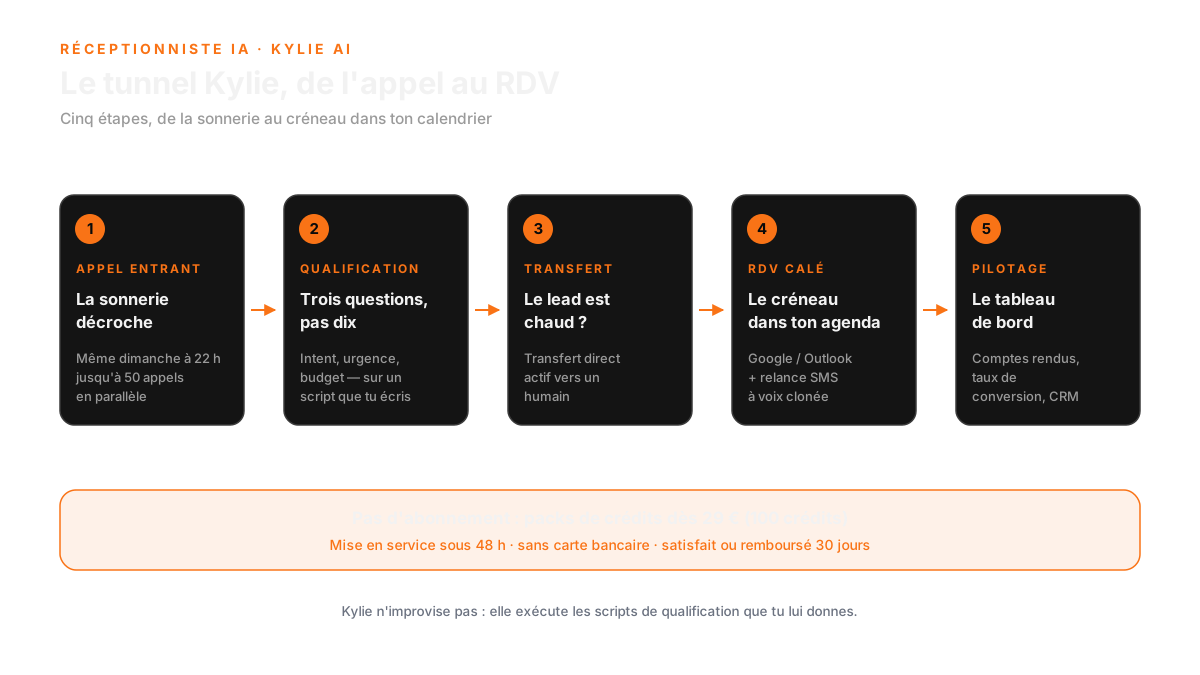
Nothing magic here: a well-wired script on your number, and some configuration discipline. Here is how the call runs, from the first ring to the signed appointment.
1. Pickup, even on Sunday at 10 p.m.
Kylie answers 24/7. Your phone rings, she picks up, and the person on the other end does not hear an answering machine. They hear a voice greeting them and asking why they are calling.
Onboarding takes 3 steps and go-live is advertised within 48 hours. You do not have an IT project to launch, you have a number to plug in.
The point that changes everything is the tone. An answering machine announces a delay, a voice announces a presence. The caller stays on the line, explains their request, and does not hang up after the second ring. That is the difference between a logged call and a started conversation.
Tip: write the opening line the way you would say it yourself on the phone. Not a call center script. The day you replay the recording of a failed call, that is the sentence you will change first.
2. Qualification: three questions, not ten
The prospect explains their situation. Kylie asks the questions you provided, spots the real deals and filters out the noise: recruiters, spam, vendors trying to sell you paper.
The goal is not an investigation. It is to screen the calls that deserve you to pick up in turn.
And above all, it is to stop sending a rep to an appointment that does not exist. Sloppy qualification means a booked slot, a cancelled trip, and a rep who loses faith in the tool. The cost is immediate, and it is counted in hours burned.
Tip: list the three questions that, in your business, separate a good lead from a bad one. Budget, timeline, location: pick from those three. One more question and the prospect gets impatient, and Kylie is repeating a script that sounds robotic.
3. Human transfer, at the right moment
This is the feature most AI receptionists advertise loudly and half-implement. Kylie's landing page talks about "Direct Active Transfer" and a transfer target configured for leads above 50K. The prospect says yes, the line goes to a human, while they are still hot.
Without that transfer, an AI receptionist becomes a pretty paid voicemail: it collects qualified prospects that you call back the next day, when half the interest is gone. The transfer is the bridge between the commercial promise and the signature.
Tip: pick your threshold before you switch Kylie on, and write it down in the config. A 45K prospect waiting ten minutes has plenty of time to call the next competitor on your list.
4. Appointment, SMS follow-up, cloned voice
Kylie books the appointment in your calendar. Then she follows up: automatic SMS follow-up (1 SMS = 1 credit), and even ringless voicemail drop with your cloned voice, meaning a voicemail left on the prospect's machine without their phone ringing.
You keep the final say: the landing also announces an SDR module for outbound calls, with the idea of unlocking a prospect's mobile number for 2 credits.
This is where the credit model becomes handy. The landing lists 1 voice call for 3 credits and 1 SMS for 1 credit: you see straight away what a follow-up costs you, instead of waiting for an end-of-month invoice to understand what happened.
Tip: sync your calendar before the first call, not after. A qualified prospect offered a slot that does not exist in your agenda is an appointment up in smoke, and you will only find out by reading the call notes.
5. The dashboard that tells you what is blocking
Tracing is complete: call notes, recordings, logged objections, conversion rates, CRM sync. The dashboard shows "Calls 30d / Voicemail 30d / SMS 30d", which is enough to see your progress without opening ten screens.
Without that dashboard you fly blind. You will know you booked three appointments, never why the other twelve fell through. With it, you get the exact list of the sentences that make a prospect hang up, and it is concrete: every objection becomes a script line to rewrite.
Tip: block 15 minutes a week to read your logged objections. It is the best free script improvement you will ever get: the exact words your prospects use to say no are worth ten copywriting workshops.
What Kylie does, and what she does not
A tool's credibility is also what it refuses to promise. Here is the honest table, filled with what the landing and the product sheet actually show.
| What Kylie does | What she does not do |
|---|---|
| Answers 24/7, up to 50 calls at once | Improvise outside the qualification scripts you give her |
| Qualifies the prospect and books the appointment in your calendar | Replace a human on a sensitive complaint or dispute |
| Direct active transfer to a human when the lead is hot | Publish the detail of its Enterprise pack (credits and price not disclosed) |
| Automatic SMS follow-up and ringless voicemail drop with cloned voice | Bill through a fixed monthly debit: here you buy credit packs |
| Call notes, recordings, objections, conversion rates, CRM sync | Guarantee the method behind "+35% bookings" (source of the numbers undocumented) |
| Outbound SDR module, mobile number unlockable for 2 credits | Spare you from writing your own scripts: that is the one job no machine will do for you |
| 3-step onboarding, go-live within 48 hours | Suit you if you want permanent human support as a backup, it is not sold that way |
| No credit card to start, 30-day money-back guarantee | Get you out of credits: above the Enterprise pack, the price is not published |
Pricing: no subscription, credits
Kylie's model is not a subscription. You buy credits, you consume them, you buy more when you need them. The mechanic is simple: 1 credit costs about 0.07 EUR excluding tax, 1 voice call uses 3 credits, 1 SMS uses 1 credit.
The packs shown on the landing (prices excluding tax, checked on October 8, 2026):
| Pack | Price | Credits | Advertised equivalent |
|---|---|---|---|
| Discovery | 29 (slashed to "was 58") | 100 credits | about 33 minutes of AI calls |
| Expansion (badge "Popular") | 139 | 500 credits | about 166 minutes of qualifying calls |
| Scale | 249 | 1,000 credits | high volume |
| Enterprise | Card present, detail not disclosed | Not disclosed | Not disclosed |
One nuance to know before you go: the landing displays "No subscription" while its FAQ compares Kylie to "139 per month". Both wordings coexist. In practice you pay for packs on demand, not a monthly debit, and that is the first table to look at.
Concretely, if you want to test without overcommitting: the Discovery pack at 29 gives you 100 credits, which the landing converts into about 33 minutes of AI calls. You can live a full month on that before deciding. If the phone really rings, the Expansion pack goes to 500 credits for 139, advertised as about 166 minutes of qualifying calls. Beyond that, the Scale pack at 249 carries 1,000 credits.
What I like in this model: you do not pay the same price for a month with ten calls and a month with two hundred. What I like less: you have to keep an eye on your consumption, and the dashboard is the only place it shows up.
The reassurance part is clear: no credit card required to start, go-live within 48 hours, 30-day money-back guarantee. For a tool that touches your business phone, that is the minimum you can expect, and it is shown on the very first page.
For the numbers, the FAQ contrasts the 1,800 of a full-time receptionist with the 139 of the Expansion pack. And the only numeric testimonial on the landing comes from real estate: 80 outbound calls per day, 28 new listings in one week. Origin of that figure: undocumented, like the others.
FAQ: AI Receptionist Features and Benefits
How does Kylie handle calls outside of regular business hours?
Kylie answers calls 24/7, ensuring that no calls are missed, even during evenings, weekends, or holidays. This allows your business to capture leads at any time, unlike a traditional receptionist.
What are the advantages of using an AI receptionist like Kylie over a human receptionist?
Kylie can handle up to 50 simultaneous calls, ensuring no leads are lost during busy times. Additionally, she does not take breaks, providing consistent coverage that a human cannot match.
How quickly can I start using Kylie after signing up?
Onboarding takes just three steps, and Kylie can be live within 48 hours. This quick setup means you can start benefiting from her services almost immediately.
The core of the problem
You do not need a perfect receptionist. You need someone to pick up, ask the right questions, and hand you the prospect the moment they are ready to talk. Everything else, you do better than a machine.
The math is quick: if a receptionist costs you 1,800 per month and only answers 40 hours a week, while Kylie runs on a pack of a few credits and never misses a call, the question is no longer whether it is cheaper. The question is how many calls you have already lost without counting them.
One last thing, and it may be the most important. An AI receptionist does not rescue a badly written script. If your qualification questions filter nothing at all, the machine will answer perfectly, ask the wrong things, and hand you prospects you cannot serve. The gain does not come from the tool, it comes from the quality of what you give it to say.
That is why I do not sell an AI receptionist in three clicks: I look at your real call volume, your script, and what you do with a prospect who says "let me think about it".
If you want to look at your real call volume and the script you need, go through our free audit. To explore the other agents we built, head to our lab. And to try Kylie yourself, here is the official page: kylie-ai.fr.
A prospect who does not get answered is a prospect who answered somewhere else.
New AI term along the way?
Clear, jargon-free definitions for business leaders.
Free AI audit · 45 min
Take action: your Express AI Audit (45 min)
45 minutes with an AI expert to evaluate your operations, identify productivity gains and map your first high-ROI AI agents.
Designed for SME leaders (10 to 100 staff) · No commitment · 100% IP ownership
Weekly AI Strategy Log for Leaders
Every Saturday morning, receive our curated field notes, actual case studies, and production benchmarks. Concise, actionable, zero spam.
Fractional AI Director locations