Team LinkedIn Engagement: Wake Up Your Whole Team's Reach
 Gary Bramnik
16 October 2026 · 10 min read
Contents
- The problem: 90% of your teammates never click
- The Squad-LKN funnel, step by step
- The 3 mistakes that kill team engagement
- And how long before it shows?
- Who it is for (and who it is not)
- What Squad-LKN does, and what it does not
- Real pricing (checked on October 8, 2026)
- FAQ: team engagement and LinkedIn strategy
- The bottom line
5:45 PM. You just hit publish on the post you spent ninety minutes writing. Next morning: 12 likes. Your mom, two colleagues who like everything, and an old client who stumbled on it by chance.
Your content is not the problem. The problem is that you are on your own.
On LinkedIn, the algorithm judges a post in its first few minutes. Nothing happens, it buries the post. Things move, it shows it to more people. Ten teammates liking and commenting at the right moment creates a launch pad no hashtag can buy back later.
The problem: 90% of your teammates never click
Scoop: it is not laziness, it is structural. Squad-LKN's own page repeats the same finding we see with almost every client: 90% of employees never engage with company posts. Organic reach divided by 10. Between 10 and 20 likes per post on average. ROI close to zero.
What a typical week looks like inside an SMB: the post goes out at 9 AM, the sales rep is in a meeting, the marketer is on another project, the CEO will "check later". Later never arrives. Every hour without a reaction is an hour of reach the algorithm writes off.
Here is where it gets absurd. The content exists, the team exists, the algorithm exists, and nobody builds the bridge between the three. Asking a sales rep to like a post at 9:12 AM is a bit like asking them to file their travel expenses: they will do it once, in a burst of motivation, and never again.
Most teams have already tried by hand. A message in the company chat: "don't forget to like the post". It holds for 48 hours. Then the message gets buried under twenty other notifications and reach drops back to the floor. Willpower was never the problem, the missing system was.
The 400% reach and 800% engagement figures quoted by Squad-LKN are vendor numbers: no measurement methodology is published, the sample is never defined. Take them for what they are, an order of magnitude the vendor promises, not a guaranteed result. Your own starting point takes two seconds to check in your feed.
The Squad-LKN funnel, step by step
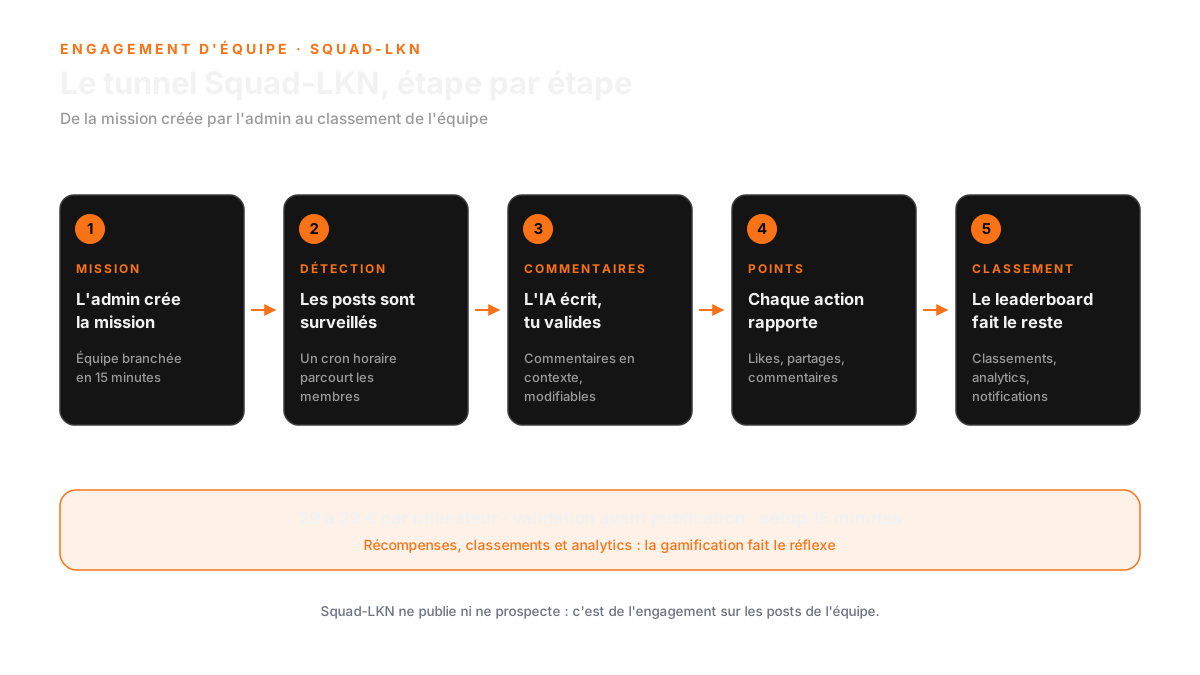
The whole idea fits in one sentence: the platform spots your teammates' posts, the AI drafts a comment in context, a human approves, the comment goes live. Fully automatic or semi-automatic, you pick. It is not a bot dropping into comment sections, it is your team becoming visible at the same time as you.
1. You connect the team in 15 minutes
Setup is advertised at 15 minutes during the beta phase: no commitment, dedicated support. You create the workspace, invite your teammates, pick the operating mode. There is no three-week IT project behind it, it is a signup and a settings page.
Tip: stay in semi-automatic mode for the first two weeks. You want to read what the AI writes before anything runs on autopilot.
2. The platform watches the team's posts
Under the hood (README and product PRD), Squad-LKN runs on Unipile with an hourly cron: every hour, the platform fetches the new posts from the members of your workspace. Nothing to copy-paste, nothing to remind anyone about.
Tip: limit tracking to the 5 or 10 people who actually publish. A short list gives you relevant comments. A list of 50 gives you mechanical noise everyone spots immediately.
3. The AI writes, you stay in control
Comments are generated without templates, using the most capable models available (Claude API on the back end). Every comment is unique, written against the real post, not recycled from one teammate to another. That is the difference between a comment that adds something and a generic "great post!".
Tip: the pre-publication check is your safety net. Comments stay editable, you approve in one click. Nothing goes out behind your back, and the platform claims 100% LinkedIn compliance.
4. Gamification turns it into a reflex
Rewards, leaderboards, analytics. Mobile and desktop apps with push notifications, so approvals happen between two meetings instead of at the end of the day, when nobody looks at their work phone anymore.
Tip: publish the leaderboard every Friday. Nothing gets twelve teammates clicking faster than a scoreboard in front of the whole company.
5. You measure what it returns
Full admin dashboard, analytics and per-user leaderboards. On the results side: 400% reach, 800% engagement, and 5x better ROI than social media agencies charging 5 to 10 K€ per month (vendor numbers, methodology not published).
Tip: run your own before/after. Same type of post, one week without team engagement, one week with it. Your number beats the seller's number, and you can put it in front of management with a straight face.
The 3 mistakes that kill team engagement
The funnel is simple. The failures are always the same, and they show up before the tool has had any chance to prove anything.
1. Switching everything to automatic on day one
You turn on automatic mode, you go on holiday, and you come back to ten generic comments published under posts nobody should have touched.
The fix: two weeks in semi-automatic mode, no exception. You edit the comments, you see how the AI reads your industry, and you only let the machine accelerate once the quality is there.
2. Trying to engage 50 people at once
Rolling the tool out to the whole company gives you 40 dormant accounts, 5 active ones and an empty leaderboard. The demotivating effect is immediate.
The fix: start with the 5 or 10 ambassadors who already publish. A small team that works beats an army that posts nothing. You expand as the leaderboard fills up.
3. Measuring likes instead of reach
If you only watch the like counter, you will conclude it does not work after the first bad post, and you will switch the tool off before seeing the cumulative effect over four weeks.
The fix: look at the company's post reach across a month, not Tuesday's likes. That is the number the algorithm watches, and it is the one that eventually puts you in front of prospects.
And how long before it shows?
Honest answer: it depends on how often your team publishes. If nobody posts inside the workspace, there is nothing to amplify, and no tool will change a silent feed.
If your team already publishes two or three times a week, the first effect shows up on the very next posts: a teammate comment inside the first ten minutes, the algorithm pushes the post again, today's reach beats last week's. That is the virtuous circle you were looking for, and it starts without you chasing anyone.
The real gain, though, shows up over a month. When twelve people comment regularly, company posts never drop back to the ten-like floor again. And when a prospect lands on one of your posts, they see a living conversation, not an orphan post with two reactions.
The timing: three months is the window to judge properly. Before that you are judging background noise, like on any channel that takes time to build.
Who it is for (and who it is not)
Squad-LKN is built for a team of 10 to 50 employees who already publish or are about to. Sales reps, the marketer, the founder, the consultants who carry the brand. If nobody on your team publishes anything, the platform will have nothing to track: start writing, then come back.
It is not built for a 200-person enterprise that wants a corporate portal with SSO and content governance signed off by three departments. Above 50 users the vendor moves to a custom quote, and that is by design.
It is not a content generator either. If you want to write your own posts with AI, this is not the place: that is what the other tools in our lab are for. Here, we work on the distribution of what you already publish.
What Squad-LKN does, and what it does not
A tool that only shows advantages is a brochure. Here is the honest version, the one that saves you a nasty surprise at the end of month one.
| What it does | What it does not do |
|---|---|
| Automatically detects team posts (hourly cron) | Does not write your own posts: this is engagement, not a content generator |
| Generates unique, in-context AI comments, editable before sending | Does nothing without approval in semi-automatic mode, but automatic mode does go out on its own once enabled |
| Gamification: rewards, leaderboards, analytics, push notifications | No published price above 50 users: custom quote |
| Mobile and desktop apps, full admin workspace | No free trial advertised on the landing: beta phase, 15-minute setup, no commitment |
| 100% claimed LinkedIn compliance, pre-publication check | Nothing in the datasheet about messaging or invitations: no prospecting here |
Real pricing (checked on October 8, 2026)
Start: 39 € per user per month. The 10-user pack comes to 390 € per month. Automatic and semi-automatic modes, contextual AI, full admin dashboard, analytics and leaderboards, support and onboarding: everything is included, there is no paid option hidden behind every click.
Growth: 29 € per user per month. The 50-user pack comes to 1 450 € per month, with exactly the same features as Start. This is the rate the vendor recommends for SMBs. The per-head price drops as the team grows, that is the only trade-off in the grid.
Above 50 users: custom quote. A tailored solution is announced for larger teams, with no public number.
Let's take real numbers. A 15-person team on the Start rate is 585 € per month (15 × 39 €). The same team at 50 people on Growth is 1 450 €. Both numbers can go into a budget the same day, with no sales meeting and no proposal to wait for.
The landing claims 60 to 70% cheaper than Smarp and Sociabble (19 to 39 € per user versus 50 to 100 €). Honesty about our own grid: the 19 € floor does not exist in any pricing card, the published cards show 29 € and 39 €. On the other side, Smarp blocks its pricing page (HTTP 403, with third-party sources mentioning 6 to 8 $ per user from a February 2026 scan) while Sociabble answers with a demo. The comparison is plausible, it is not verifiable line by line.
What is verifiable is the price of a social media agency: 5 to 10 K€ per month, versus 1 450 € for 50 users here. With 30 engaged teammates, two posts outperforming your usual baseline already pay for the difference.
FAQ: team engagement and LinkedIn strategy
What is the main issue with team engagement on LinkedIn?
The main issue is that 90% of employees do not engage with company posts. This results in significantly reduced organic reach and low ROI, as posts are often buried by the algorithm without initial engagement.
How does Squad-LKN improve team engagement on LinkedIn?
Squad-LKN automates the process by detecting teammates' posts, generating unique comments using AI, and requiring human approval before they go live. This encourages timely engagement without needing constant reminders.
What are the results I can expect from using Squad-LKN?
While the vendor claims 400% reach and 800% engagement, these numbers are not guaranteed. It's best to measure your own results by comparing engagement before and after using the platform.
The bottom line
Squad-LKN is not built for a 200-person company that wants a corporate portal. It is built for the 10 to 50-person SMB that wants its posts to finally leave the same five-person like circle.
We built this funnel in our lab, with the same rules we apply to every tool we ship: published pricing, human approval, no end-of-month surprises. The official site is here: squad-lkn.com. And if you would rather have us look at your context before you subscribe to anything, the free audit exists for exactly that.
Reach is not something you ask for, it is something you share. And inside a team, it starts with ten people clicking at the right moment.