Best LinkedIn comment tool: 5 options compared
 Gary Bramnik
13 October 2026 · 10 min read
Contents
Five tools promise to handle your LinkedIn comments. The cheapest costs $15 a month, the most expensive $99. None of them does exactly the same thing, and their pricing pages do not all tell the same story.
I collected these prices on October 8, 2026, straight from the official sites. No vague ranges, no fuzzy "starting at": the numbers you read below are the ones displayed that day.
The point is not to sell you mine. It is to help you choose based on what you actually want to do, then explain honestly why, on some points, I preferred to build our own.
Scope of this comparison: only tools whose core touches LinkedIn engagement, comments first. Content creation suites and follow-up CRMs get their own comparisons, we leave them out so we do not mix things that do not replace each other. A tool that writes your posts will not comment for you elsewhere, and the other way around.
The 5 criteria that actually decide
Before comparing tools, we need to agree on what we measure. Without explicit criteria, a comparison becomes a price list, and the cheapest wins every time without deserving it.
1. The comment must be the product, not an accessory
On several of these tools, the comment exists, but it is one brick among profile views, invitations and automatic messages. If your goal is showing up in the conversation, you want a tool whose homepage talks about comments, not an automation suite that hides the feature in a menu.
2. Your voice, and approval before anything goes out
A comment written by an AI that does not sound like you is worse than no comment. It shows at first glance, and it costs more than the time it saved. Two questions to ask every tool: is the text written in my voice, and do I approve before it goes out?
3. The real price over twelve months
The entry price says nothing. A monthly plan at $99 and the same plan at $79 per month billed annually are not the same tool over a year. Same story between dollars and euros excluding VAT, between a displayed price and a billed price. This is the criterion where verification changes the most, and you are about to see why.
4. What surrounds it: the funnel
Comments only, or the full funnel? Target selection, contextual invitations, first message, follow-ups. Some tools do the whole chain but take an hour to configure, others hand you the first link and let you improvise the rest.
5. Language and support
This criterion always tags along in this kind of comparison, never at the front: page, support and documentation in English or French. When you get stuck on a Sunday night because nothing works, you would rather search in your mother tongue. It is a detail on spec sheets, and often the one that decides renewal.
The five tools, one by one
Linked Helper: $15 a month, the cheapest of the panel
It is the cheapest of the five, by a distance. Standard licence from $15 a month. On the annual plan, the local version drops to $8.25 a month and the cloud version to $16.50 a month. No competitor in this comparison goes below the $10 mark.
It is a mature LinkedIn automation tool built to chain actions at volume: profile views, invitations, messages, campaigns you configure yourself. Interface and pages in English.
Strength: the unbeatable floor price, plus a local version for people who want to keep control of their browser. Weakness: nothing in the offer talks about writing comments in your voice. It is a sequence machine, not an instrument for taking a stance.
Dux-Soup: $55 local, $99 cloud
Dux-Soup is a veteran of LinkedIn automation, installed in your browser. Its STACKED offer comes in two hosting options: local at $55 a month ($41.25 a month billed annually), cloud at $99 a month ($74.17 a month billed annually).
The local or cloud choice is genuinely useful: you can keep your automation on your own machine instead of running everything through a third party. Annually, the local version comes out at $41.25 a month, which is defensible.
Strength: local or cloud flexibility, and an annual local rate of $41.25 a month. Weakness: everything happens in English, and the comment is just one brick in a machine you have to configure yourself. If you only want to comment well, you pay for and tune features you will not use.
Expandi: $99 a month, a single tier
Expandi does not offer a range. One single plan: $99 a month billed monthly, $79 a month billed annually. It is easy to read, and it is also the highest entry price of the panel.
The positioning is clear: cloud automation, nothing to install in the browser, everything included from the start. For a team that wants to tool up its entire LinkedIn prospecting in one go, a menu-free product has real value.
Strength: one single plan, everything included, no menu to decode, no extension to maintain. Weakness: $99 a month up front for a solo consultant who wants to test the commenting mechanic is expensive to start with. And the bill arrives in dollars.
MeetAlfred: $59 a month, with a detail worth noticing
The Individual plan shows $59 a month, or $35 a month billed annually. Above that, Business goes to $99 a month ($59 annually) and Teams to $79 per seat ($47 annually). The annual pricing is aggressive, especially at $35.
Now the anecdote of the day, verified on October 8, 2026: the structured data of the page and its static text still display $29 and $39. The real prices come from the page's JavaScript and a help article dated October 1, 2026. Two layers of truth on the same page.
Strength: the $35 a month annual offer, and a clear per-seat logic for teams. Weakness: when a page shows two different prices depending on where you look, you verify before committing. This table is exactly what I could confirm.
Engagr: €19 excluding VAT, and yes, it is ours
Engagr is the AI French Touch tool. I am not going to pretend otherwise in a comparison I am writing myself.
The product runs on three plans: Light at €19 excluding VAT a month for 50 tracked authors and 10 AI comments a day (200 a month), Pro at €39 excluding VAT a month for unlimited authors and comments, Max at €69 excluding VAT a month to open the whole funnel: Snipr with 150 prospects, Reverse, Invitr, Bookr, plus 20 free Boostrs a month.
The differentiating point is simple: the AI writes in your voice, in 6 opinion styles, and nothing goes out without your approval. The Reverse module, which I did not find in any of the other four, watches the posts your prospects comment on. The page is in French, prices are in euros excluding VAT, and the free trial runs for 14 days on Light.
Strength: the comment in your voice with mandatory approval, plus a monitoring module I did not see anywhere else. Weakness: volume. Snipr stops at 150 profiles, and we do not sell thousand-recipient sequences. On pure high-volume prospecting, the other four go further.
The table, in ten seconds
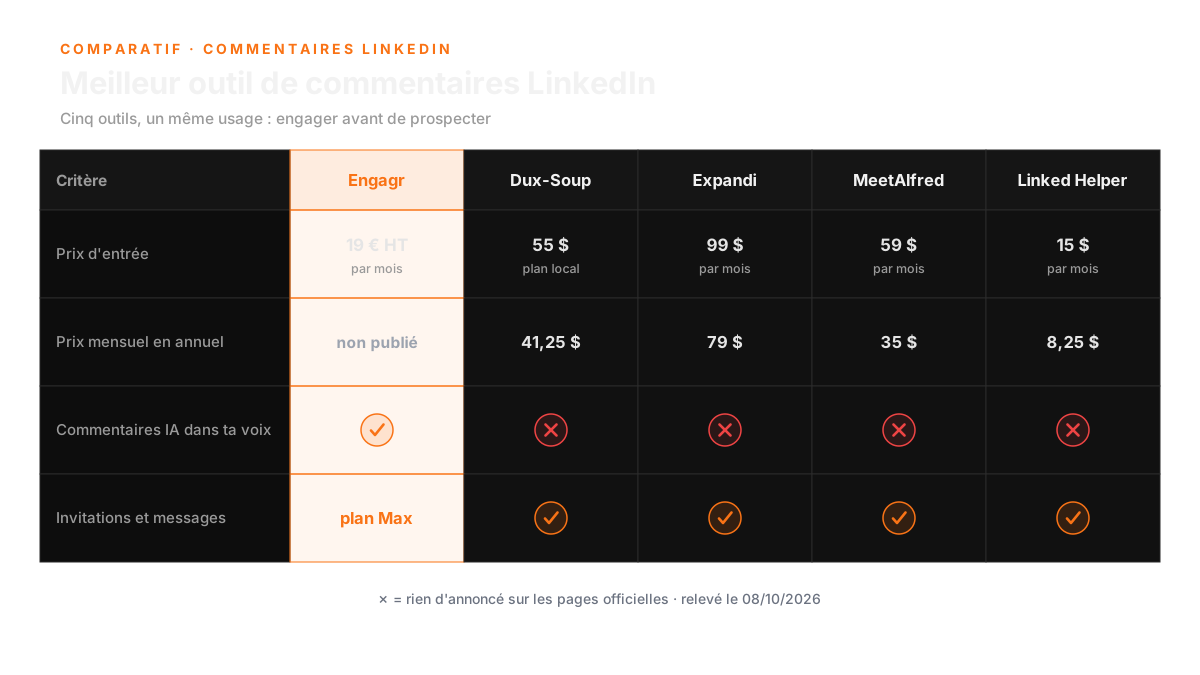
"Nothing announced" cells: nothing found on the pricing pages on October 8, 2026. That is a reading of the pages, not proof of absence.
| Criterion | Engagr | Dux-Soup | Expandi | MeetAlfred | Linked Helper |
|---|---|---|---|---|---|
| Monthly entry price | €19 excl. VAT | $55 local | $99 | $59 | $15 |
| Annual equivalent per month | not published | $41.25 local | $79 | $35 | $8.25 local |
| AI comments in your voice | yes, 6 styles | nothing announced | nothing announced | nothing announced | nothing announced |
| Human approval before sending | mandatory (0 autopilot) | not specified | not specified | not specified | not specified |
| Invitations and messages at volume | on the Max plan | core product | core product | core product | core product |
| Pricing page in French | yes | no | no | no | no |
Three rows are enough to orient a decision. The first says how much you spend to start, the second what the annual plan really changes over twelve months, the third whether the tool talks about comments or only about automation. The remaining rows confirm or deny what each page claims. An empty cell accuses nobody: it only says that criterion was not being sold on the day of the check, and that you will need to dig by yourself before paying.
FAQ: LinkedIn comment tools comparison
What criteria should I consider when choosing a LinkedIn comment tool?
You should focus on five key criteria: the comment as the main product, ensuring the text reflects your voice, understanding the real price over twelve months, the surrounding funnel features, and the language and support options available.
Why is it important for comments to be written in my voice?
Comments that do not sound like you can be more damaging than not commenting at all. They can be easily recognized as inauthentic, which defeats the purpose of engaging meaningfully in conversations.
What is the price range for the tools compared in the article?
The tools range from $15 a month for Linked Helper, which is the cheapest, to $99 a month for Expandi, which is the most expensive. Each tool has different features and pricing structures.
The verdict, no commercial rounding
On three criteria, Engagr wins. The comment written in your voice with mandatory approval is the only one in the panel that states it that clearly. The Reverse module, I did not see it on any of the other four. And pricing transparency too: euros excluding VAT, a 14-day trial announced right on the card, no tier that changes price depending on which layer of the page you open.
On two criteria, we lose, and better to say it before you find out. The floor price: Linked Helper at $15 a month, and $8.25 annually on the local version, costs less than our €19 Light. Volume: Dux-Soup, Expandi, MeetAlfred and Linked Helper push invitation and message automation at a scale Snipr does not target, since it stops at 150 profiles.
We finally share one criterion: breadth of features against price. At €39 excluding VAT, our Pro costs less than MeetAlfred's Business at $99 and Expandi at $99, but they pack in more channels and more sequences. If you want breadth first, they do better. If you want comment quality first, we do better.
For a quick decision, here is how I read this table. You are starting out and you want to test the commenting mechanic at the lowest price: Linked Helper, no discussion. You want to automate your whole LinkedIn prospecting, and the comment is only one link in the chain: Expandi or MeetAlfred on the annual plan will give you more chain. You want every comment to sound like you and nothing to go out without your approval: then you are on Engagr, and you can look elsewhere without finding the same promise. In every case, start with the trial rather than the annual subscription.
We built Engagr because we were tired of that false choice. On one side, manual copy-paste, honest but impossible to scale. On the other, the sequence machine, effective but speaking in your place. What was missing was a tool that takes the pen for you without ever signing for you. That is the one we wrote, and I will let you judge the evidence.
If you want to see what it does on your own ground, start with our free audit: 45 minutes to find where your network is losing conversations. After that, the full funnel lives in our lab, and the pricing details are on engagr.fr.
The best LinkedIn comment tool is the one you actually open every morning.
The others, you still pay for them.