Home / Blog / Agents & Automation
DeepSeek Harness: The Free Claude Code, Installed in 5 Minutes
 Gary Bramnik
28 August 2026 · 13 min read
Contents
- The brain and the body
- Installation: five minutes flat
- The four modes (and when to use them)
- Plugging it into everything: Zapier and the skill catalog
- Claude Code or DeepSeek Harness? The real answer
- The five questions I get all the time
- FAQ: DeepSeek Harness Installation and Features
- What I take away from it
I installed a Claude Code clone last night. It took five minutes. No credit card, no subscription, nothing.
Then I asked it to build itself a memory. It wrote the tool live, and showed me the full breakdown at the end: how many tokens, how long it took, what happened at every step.
The thing is called DeepSeek Harness. Over 180,000 GitHub stars in about ten days. MIT license. Free. And if you only remember one thing from this article, it's this: the model is no longer the story. The harness is.
The brain and the body
The model is the brain. The harness is the body.
Claude is a brain. Claude Code is the body that makes it act on your machine. DeepSeek V4 Flash is a brain. DeepSeek Harness is the body DeepSeek just open sourced, for free, and you can put any brain inside it.
Why is this a turning point? Because until now, the best bodies were locked. Claude Code belongs to Anthropic, Codex to OpenAI. Switching models meant switching tools, relearning shortcuts, recreating your configs, retraining your habits.
DeepSeek Harness breaks that lock. It's a universal body: you plug in whatever model you want (DeepSeek, Claude, GPT-5.6, a local model under Ollama), and you keep the same environment, the same tools, the same reflexes. If the model of the moment changes in six months, you unplug the old one, plug in the new one, done.
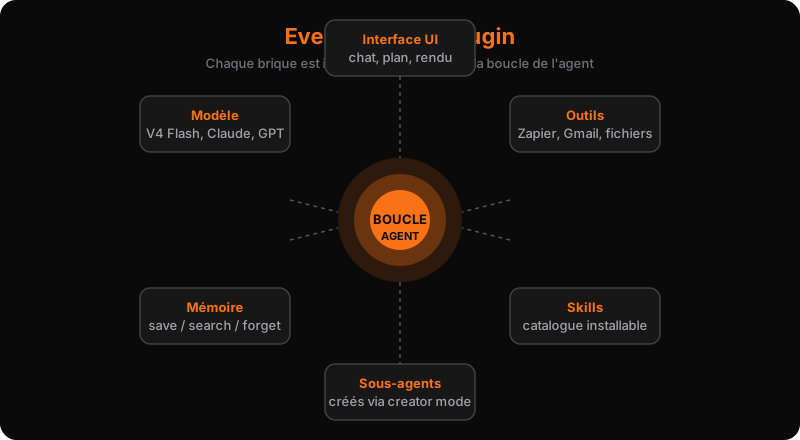
The strongest part is that the body itself is modifiable. The founding principle fits in four words: everything is a plugin. The chat, the tools, the UI, the memory, the sub-agents, even the main loop that makes the agent think: all plugins. You pull one piece out, replace it with your own, and the rest keeps running. It all sits on Cordis, DeepSeek's spatiotemporal composability framework.
Here's a comparison that lands. Claude Code is a preset Lego build: excellent, but if you don't like the shape of the roof, you can't change it. DeepSeek Harness hands you all the bricks and the manual. If you've always wished your agent spoke to you a certain way, always had that type of icon, or never showed that UI section: you can make it happen.
One honest warning before we go further: this is a developer preview. The project iterates fast, and it may break underneath you. But at this price (zero euros), that's playable.
Installation: five minutes flat
Prerequisite: Node.js installed. That's it.
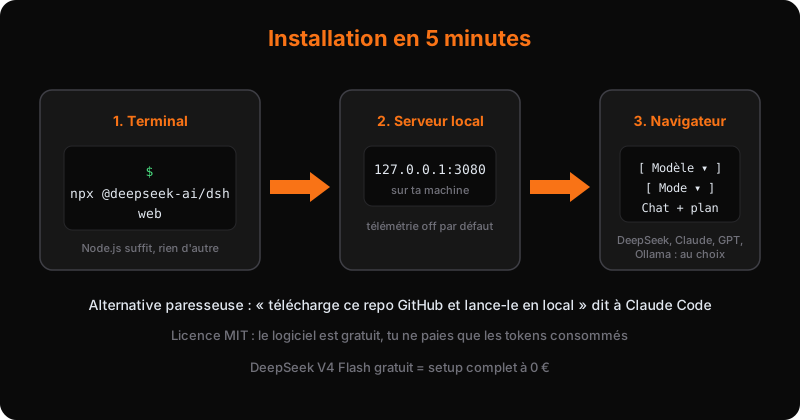
Open a terminal and type:
npx @deepseek-ai/dsh web
The server starts, and the interface opens in your browser at http://127.0.0.1:3080. A local web page, not a desktop app. You already live in your browser, the harness moves in.
If you don't feel like typing commands, there's the lazy way: open Claude Code and tell it "download this GitHub repo and run it locally". You paste the link, it clones the repository, installs the dependencies, starts the server. You haven't lifted a finger.
And for those who want full control, the source version:
git clone https://github.com/deepseek-ai/deepseek-harness.git
cd deepseek-harness
pnpm install
pnpm run build
pnpm dsh web
On first launch, you pick your model and provider. DeepSeek V4 Flash is free. If you want to run Claude or GPT-5.6 inside it, you paste your API key. OpenRouter works too, including its free models, which means you can start at exactly zero euros.
And you're off. The interface looks like what you know from Claude Code: a chat, a plan, files to approve, a token counter.
The four modes (and when to use them)
The first thing to look at in the interface is the mode selector. Four positions, four uses:
1. Standard
The full coding agent. It reads your files, edits them, runs commands, proposes plans. This is the everyday mode, the one I use 90% of the time.
2. PTC (Plan-Think-Code)
Standard, plus tools exposed through the Codex SDK. Concretely: instead of chaining ten tool calls one by one, the model can combine several operations into a single TypeScript program. It's the "think before acting" mode, built for multi-step tasks where every mistake is expensive.
3. Minimal
The stripped-down interface. Just a chat, no plan, no files. For quick questions that don't deserve a full session, and to avoid burning context for nothing.
4. Creator
The building mode. All standard capabilities, plus runtime inspection. It's meant to create custom agent presets: your own configuration of model, tools and skills that you can reuse in every session. This is where you build your own Claude Code.
My advice: start with Standard. The temptation to jump into creator mode is strong (everyone wants to customize before knowing what to customize), but Standard does 95% of the job at first.
The memory example
During my tests, I did a simple thing: "build yourself a memory tool".
The agent laid out its plan, then coded a lightweight memory layer with three functions: save, search, forget. It showed me the token count and the time spent, then generated an HTML page to visualize the result. A small interface that lets the agent remember from one conversation to the next.
Understand this clearly: it's not a better prompt. It's the agent modifying its own body, inside a harness whose code you own. That's the whole difference with a closed product: you don't ask an editor for permission to add a feature.
Another example I tested: I gave it an interface mockup as a reference and asked it to build the same thing. It produced the structure, the styling, and a genuinely clean result. Design taste isn't reserved for premium harnesses. You just have to bring it with you.
Plugging it into everything: Zapier and the skill catalog
A harness on its own is nice. A harness plugged into your tools is an employee.
The shortest path goes through Zapier. Why Zapier instead of a direct connector to each service? Because it's your single authentication layer. You connect once, and all your services go through the same pipe: Gmail, Outlook, your personal apps. One place to maintain, one place to revoke if you ever change your mind. Same principle when you link your different agents (Codex, Claude Code, the harness) to your personal tools: one layer, connected once, shared everywhere.
Concretely, the integration takes two sentences. You open a new session and ask the agent to integrate Zapier into the harness so it can draft emails on your behalf. The connector installs itself.
Then, the typical use case: "go to Gmail and draft me an email for...". The agent makes a real tool call to your inbox. You see it call the tool, you see the response, you approve. The draft is built in the harness with the same level of detail as in Claude Code: nothing is sent without review.
And there's the skill catalog. Like Claude Code skills, but in a harness whose code you own. You can install existing skills or write your own, and they show up in the interface when you launch a session.
Claude Code or DeepSeek Harness? The real answer
I no longer use one or the other. I use both, on different tasks. Here is my decision matrix.
Claude Code (or Codex) when:
- The output is client-facing and polish matters
- You're building a site or an interface with a real design point of view
- You want zero surprises and reliability
Claude Code has one advantage that's hard to copy: design taste is baked into the product. Brain plus body, as the English speakers say. Claude Code's body carries years of fine-tuning on aesthetics. With the DeepSeek harness and a cheap model, you can aim for the same result, but you'll have to build that taste yourself, skill by skill. If the time you spend on it costs more than the token difference, stay on Claude Code.
DeepSeek Harness when:
- Volume work, where price matters: the workhorse
- A new model drops (a Qwen, a local model) and you want to test it without reinstalling anything
- You want to own your tool, modify it, evolve it
This is where we need to talk about the workhorse concept. The way I think about AI has two tiers. Frontier models (Claude, Fable, GPT-5.6): peak performance, reserved for critical tasks. And the workhorse: 1% of the price, 95% of the capability. That's DeepSeek V4 Flash.
DeepSeek V4 Flash is, by the way, the most used model on OpenRouter by volume: over 11 trillion tokens served. People aren't using it for show. They use it because on 80% of tasks, the difference with a frontier model is invisible, and the invoice is not.
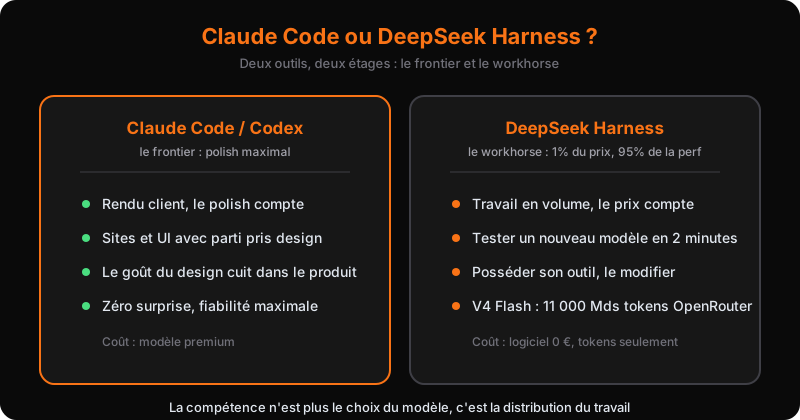
The harness is free (MIT license). You only pay for tokens. And if you want to pay zero tokens, OpenRouter's free models work too, although I recommend sticking with DeepSeek V4 Flash: it's simply a better model.
The five questions I get all the time
Is it really free?
Yes. MIT license, zero euros for the software. You pay for the tokens you consume, period. Since DeepSeek V4 Flash is free, a complete zero-euro setup is possible.
Does my code go to China?
No. It runs on your machine, not in the cloud. Telemetry is off by default. If you want extra insurance, plug in a local model (via Ollama for example) and nothing leaves your network.
Can I use my Claude Code subscription inside it?
No. The harness works with API keys. Your Claude Code subscription stays on Claude Code.
Does it work with local models?
Yes. Anything Ollama can run, the harness can use.
Are there plugins?
Yes, a plugin store exists (search for the dsh-plugin topic on GitHub), but you don't need them to get started. The base tool is more than enough to understand the mechanics and have fun with it.
FAQ: DeepSeek Harness Installation and Features
How long does it take to install DeepSeek Harness?
Installing DeepSeek Harness takes just five minutes. You only need to have Node.js installed, and then you can set it up with a simple command in your terminal.
Do I need to pay for using DeepSeek Harness?
No, DeepSeek Harness is completely free to use. There are no credit card requirements or subscriptions involved in the installation process.
What can I customize in DeepSeek Harness?
DeepSeek Harness allows you to customize various aspects of your agent. You can modify the chat, tools, UI, and even the main loop, giving you full control over how your agent operates.
What I take away from it
The value is no longer in choosing the model. It's in distributing the work.
The real skill in 2026 isn't using Claude Code or DeepSeek Harness. It's knowing which task goes to which model, in which body, at the right price. A client-facing design goes to Claude. A wave of two hundred emails to draft goes to the workhorse. An internal tool prototype goes into creator mode. And the whole thing is supervised like a budget, not like a toy.
That's exactly the kind of project I set up inside companies: multi-model routing, agents on volume tasks, a toolbox that runs without anyone thinking about it. If you want to see what that looks like concretely in your business, a free 45-minute audit is enough to walk away with the first three automations to plug in.