Prompt Engineering: How to Tame Verbose Opus 5


There's something nobody dares to say about Opus 5: it's the smartest model on the market, and the most annoying colleague to work with.
It answers in twelve paragraphs when two would do. It drops "load-bearing" into every other sentence. It assumes you know every acronym in your own industry. And it signs your commits with a thank-you note, as if it had done the work itself.
The good news: the problem is known, and Anthropic itself shared an official fix. The better news: behind that fix sits a much more powerful principle, one that applies to every model released after it. Opus 6, Opus 7, doesn't matter.
Prompt engineering is not dead. It has never paid better. Here is how I turned the chattiest model of the moment into a precise senior engineer, using two layers of fixes: Anthropic's official one, and the system-level method I use every day.
The diagnosis: two symptoms, one invoice
When we talk about Opus 5's problems, two things need to be separated.
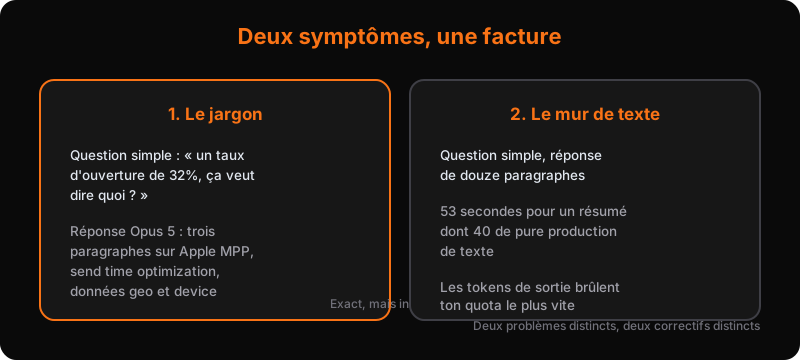
Symptom 1: jargon. The model uses far more technical terms and acronyms than its predecessors, and it assumes you know all of them. Real example: I asked Opus 5 what a 32% open rate on our CRM dashboard meant, mentioning that a peer had told me open rates were basically fake now. Answer: three paragraphs about Apple Mail Privacy Protection (MPP), send time optimization, and geo and device data derived from opens. Technically correct. Humanly unusable.
Symptom 2: the wall of text. Ask a simple question, receive a dissertation. The worst part is the cost: output tokens are what burn through your quota fastest, whatever plan you're on. A blog post summarized in 53 seconds, 40 of which were pure text production, is budget torched for nothing.
This isn't a niche complaint. An article that made the rounds on X recently put the problem in one sentence I find perfect: "reading AI output today is extra effort." It's verbose, it contains all-too-plausible nonsense, and it's increasingly jargon dense.
The trap is that Opus 5 sits at the top of the benchmarks (leading on artificialanalysis.ai as I write this). So the problem isn't the model's intelligence. It's its default behavior. And default behavior can be corrected.
The official fix: Claude Code's output style
Anthropic communicated a simple fix for the jargon problem. It fits in one word: output style.
In Claude Code, type /config, and you'll find the "output style" setting. It's the style in which the agent talks to you. By default, it's set to "default", Opus 5's verbose, jargon-heavy mode. Three other styles ship out of the box: proactive, explanatory, learning.
The fix is to add your own custom style, named ELI5 (Explain Like I'm 5). Why does this acronym work so well? Because models were trained on the entirety of the internet, including the ELI5 subreddit and its thousands of questions asked in that format. The model already knows what "explain like I'm 5" produces as a language level. You don't have to teach it, just ask for it.
You can reinforce the style with a sharper variant: the ASD-STE100 standard, a simplified technical English that uses a restricted dictionary of easy words. It started in aviation maintenance, designed so instructions stay understandable to everyone. Applied to an AI agent, it mechanically eliminates jargon and vague phrasing.
How to install it (without typing anything yourself)
The easiest way: paste the ELI5 style prompt into Claude Code and ask it to install it. It creates the ELI5.md file in your output styles folder, updates your settings, and you're done. Then open a new session and ask which output style it's using, just to confirm.
Why output style beats CLAUDE.md
You could put the same rules in your CLAUDE.md. It works, but it's less effective. Two reasons:
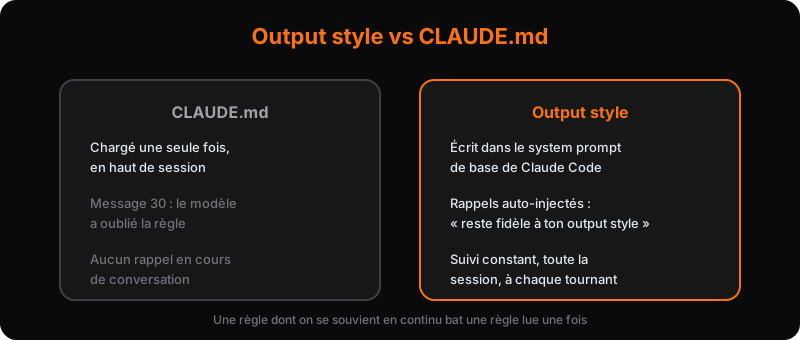
- The output style is written into the base system prompt of your Claude Code instance. It's the deepest layer, the one with the most weight.
- More importantly: Claude Code automatically injects mid-session reminders like "stick to your output style." Your CLAUDE.md is only loaded at the top of the conversation. Thirty messages in, the model has forgotten it. The output style gets reminded continuously.
Result on the same open rate example: the answer starts with the conclusion ("that 32% is not all real people"), tells the story clearly, and ends with a sentence anyone can understand. No unexplained MPP, no geo data.
The anti-wall-of-text skills
For the wall of text, careful: don't put a length rule in your output style. On production or code work, you sometimes need long, detailed answers. A global "answer short" rule would cost you information exactly when it matters.
The right granularity is the skill. Three examples I use:
/bro: the shortest one in the world, a single line. "Restate the last message in plain human language with zero jargon." You invoke it right after receiving a wall of text, and it rewrites it. On the 32% example, the /bro version gives: "That 32% never meant 32 out of 100 people actually read your email. Here's how it actually works."
wait what?: a skill by Matt Pocock, barely longer. "I don't understand where you've got to here. Repitch that with a little bit of context." Perfect when the agent got lost in its own logic and you don't want to reread three paragraphs to understand the shortcut.
/quick: my personal skill. You declare a number, it gives you that many essential points, in order. /quick 3 after a wall of text, and you get the three takeaways without rereading the essay. The skill has rules for both cases: with a number, without a number.
The lesson: build your own skills rather than copying mine. Everyone works in their own context, with their own files. But the ideas transfer: a short skill, a single intent, invoked on demand.
The system method: why prompt engineering isn't dead
The official fix handles jargon. For everything else (style, tokens, scope, verbal tics), there's a deeper layer: the system prompt.
Reminder: you prompt your agent in two ways. The user prompt is the task at hand. The system prompt is the law applied to every task. Yet most engineers never touch their system prompt. They stack skills and slash commands, and miss the one place where every word written gets multiplied by every user prompt.
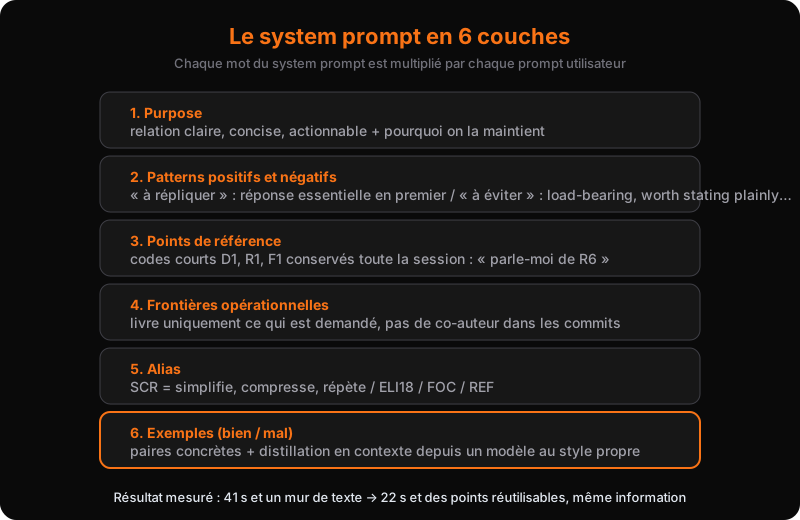
I ran the test properly: two Claude Code instances side by side, same task (summarizing a long technical article), one with the default system prompt, the other with a system prompt I build section by section. Here are the six layers, in order.
1. Purpose, and the why
No role, no "you are an expert". Just a relational contract: "you and I maintain a no-BS, clear, concise, actionable relationship. Every word we exchange reinforces that mode of communication." And above all, explain why: "so we can deliver the best possible results for our team, business, and customers." Models follow a rule better when they understand its reason.
2. Positive and negative patterns
Two lists. The first, what you want to see: "I always see the last thing you write first, place the most important information there" (so you can skip the rest if you want), "use plain, specific language", "state each fact once", "match the level of detail to the level of the task", "challenge incorrect assumptions directly, and explain why".
The second, what you never want to see again. And here, be precise. My personal banned list: load-bearing, worth stating plainly, here's the honest truth, the real tension, carry the argument. Plus: no analogies, no dash overuse, no gratuitous flattery, no decorative headings or emoji, no semicolons. You're allowed to do your own housekeeping: it's your own expressions that belong on that list.
3. Reference points
The most profitable pattern in all of prompt engineering, in my opinion. The rule: when presenting three or more items (decisions, options, risks, questions, actions, findings), use a numbered list with short codes. D1 for decisions, R1 for risks, F1 for findings. Keep the same codes throughout the conversation. Don't create codes for short, simple answers.
The payoff is immediate. Instead of "tell me more about the existential self-improvement risk you mentioned in the second paragraph", you type "tell me more about R6". The agent knows exactly what you mean. You repeat nothing, it repeats nothing, nobody burns tokens. You just built a private language with your agent.
4. Operational boundaries
Frontier models were trained to "find the answer at all costs". Opus 5 is the champion of it: it finds and flags problems you never asked about, widens the scope on its own, and loses focus along the way. The fix fits in one sentence: "deliver only what was requested, at the intended scope."
Then detail it: don't widen the work into cleanup, refactoring, or documentation nobody asked for. Don't speculate on abstractions for future requirements. Don't claim completion without evidence. Never add a co-author to commit messages (yes, Opus 5 does that, and it gets old fast). And for completed work, a concise restatement, not an exhaustive recap.
5. Aliases
Shortcuts defined in the system prompt, like bash aliases. You type three letters, the agent expands the matching rule. My four basics:
- SCR: simplify, compress, and repeat your response
- ELI18: explain like I'm 18, simplify the language, shorten the response
- FOC: focus on what matters most, what's the true signal, what's the true value
- REF: rewrite your response with reference points
Safety rule: if the alias appears inside a longer string, it's not an alias, don't expand it. And chaining aliases works: you can run ELI18 then SCR on the same answer to compress it in two passes.
6. Examples
The final layer: concrete "how we communicate / how we don't" pairs. It's like handing the model in-context training data. Real example: "User: is legacy JSON still referenced? Good: no, the only match of the file is itself, no imports, no docs point to it. Bad: great question! I will explore the repository and..."
I was writing these pairs back in the GPT-3.5 and GPT-4 days. They still work. That's exactly how you recognize a durable skill: it worked three years ago, it still works.
And there's the final trick: in-context distillation. Boot up a model whose answers you like (Claude Fable 5, for instance, which doesn't have Opus 5's verbal tics). Copy its clean response into your system as the "good" example. Copy Opus 5's smartass response as the "bad" example. Clean it up, reformat, and your agent now has a reference model to follow. You transfer one model's style to another, with no fine-tuning, for free.
The measured results
On the same summarization task, side by side:
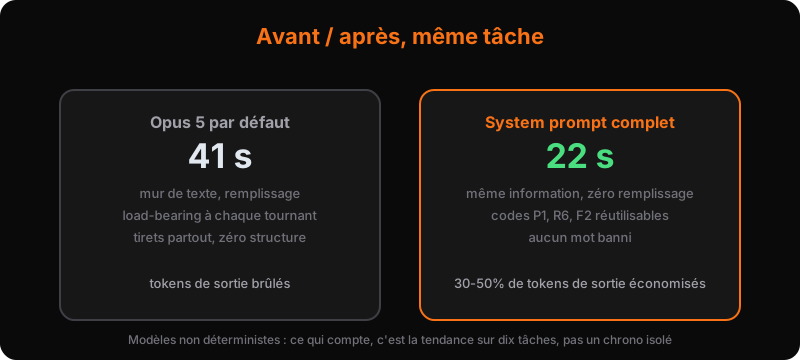
- The default instance: 41 seconds, whole paragraphs of filler, load-bearing at every turn, dashes everywhere.
- The full system prompt instance: 22 seconds, the same information, reference points (P1, R6, F2) I can reuse later in the conversation, and not a single banned word.
Almost twice as fast, for the same useful content. And remember: output tokens are the most expensive part of your consumption. Every shortened answer gives you quota back. On intensive daily use, that's roughly 30 to 50% of output tokens saved, depending on the task type.
One caveat: models are not deterministic. One run can be faster than another for no reason. What matters is the trend across ten tasks, not the stopwatch on a single one.
What I take away from it
Some say prompt engineering is dead, because big models no longer need heavily structured prompts to perform. That's a misunderstanding. The fact that Claude Code shrank its default system prompt doesn't mean you shouldn't write yours. It means the vendor removed the default setting. Your own behavior, your exclusions, your private language, your boundaries: nobody will write those for you.
And there's a deeper reason: the bottleneck is you. In a day of agentic work, the model is almost never the limit. The limit is how fast you can communicate with it, sort what matters, decide where to invest your attention. An engineer who can write a system prompt communicates ten times faster with their agent than one stacking skills at random.
Great engineering is great communication. With your team, with your agents, and with yourself. True fifteen years ago, and now it's literal: we code through conversation.
And if you'd rather have someone install all of this for you (output styles, system prompts, homegrown skills, the right models in the right places), that's exactly the kind of project an outsourced AI direction takes on. A free 45-minute audit is enough to walk away with your first three settings applied.
See also the AI glossary
Take action: your Express AI Audit (45 min)
45 minutes with an AI expert to evaluate your operations, identify productivity gains and map your first high-ROI AI agents.
Designed for SME leaders (10 to 100 staff) · No commitment · 100% IP ownership
Deploy AI Agents in your SME with an External CAIO
Get an outsourced AI Director 1 to 10 days per month to audit, automate your workflows and train your teams.
Stay ahead of AI Innovations
Every week, get a curated selection of our latest articles, case studies, and actionable AI insights directly in your inbox. No spam, 100% value.
Fractional AI Director locations