Grokbot: Build your AI agent army

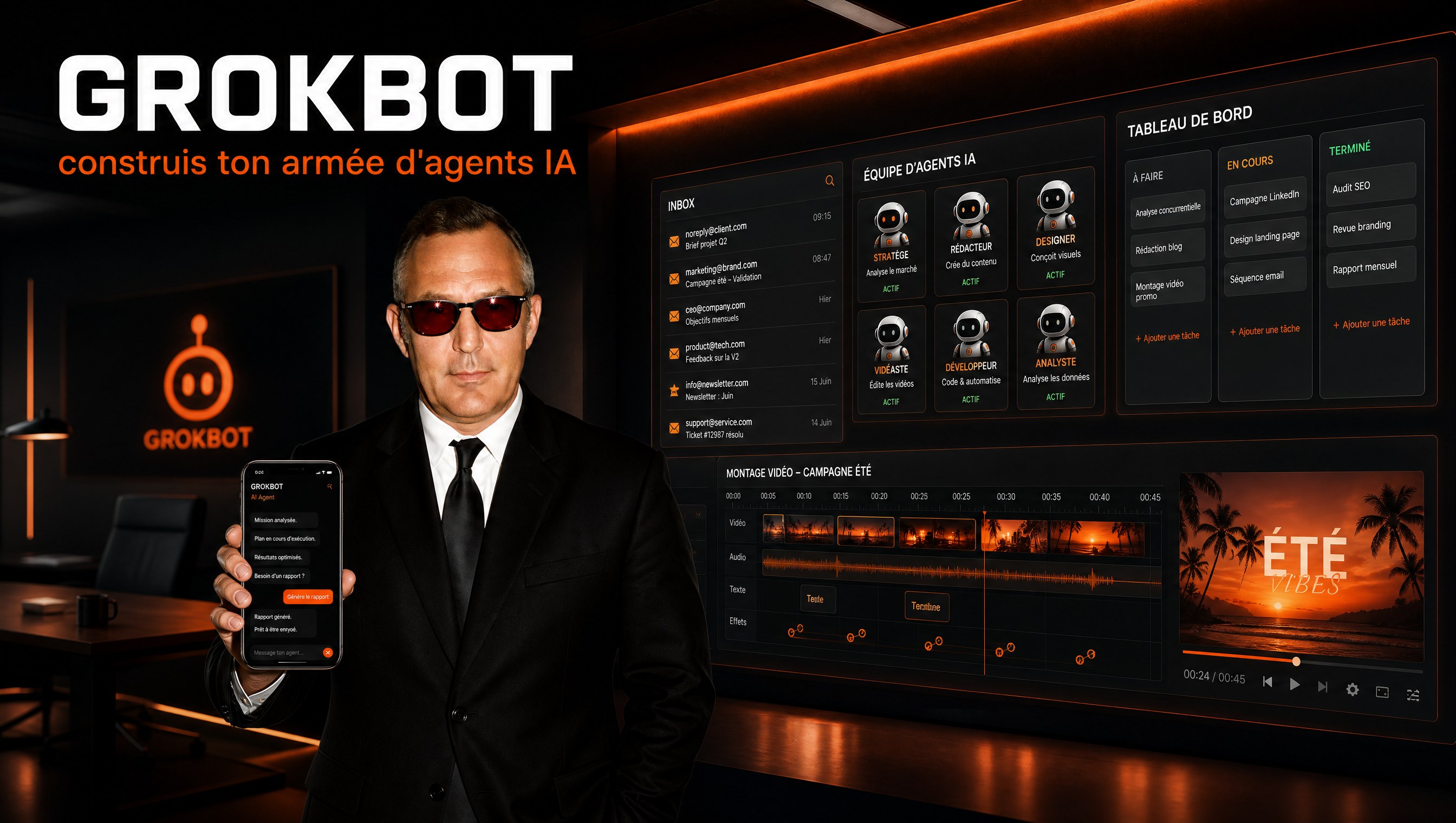
Monday morning, 8:47am. I open my phone between two coffees. Overnight, three client emails got triaged, two urgent replies got drafted, a weekly report was generated and dropped into Google Sheets, and four tasks were created in ClickUp. I didn't ask anyone to do anything. The system ran by itself, while I was asleep.
For months I was building this kind of automation with technical tools. Then I discovered Grokbot and rebuilt everything in a weekend, without writing a single line of code.
Grokbot is an army of AI agents in your pocket. And the craziest part: you don't need to be technical to get real value out of it. In this guide, I'll show you everything I learned, how to create each agent, connect your tools, automate your processes, and even turn it into a paid service offering for clients.
Let's go.
What Grokbot actually is
Grokbot is AI teammates that you give real work to. They sign in, they use your tools, they take action on your behalf. You talk to them like colleagues, in a Telegram-style interface.
The big difference with the dev tools you might already know: Claude Code and Codex are for sitting at your desk building projects. Grokbot is for piloting from your phone, at lunch, on vacation, or while you sleep.
| Claude Code / Codex | Grokbot (xAI) | |
|---|---|---|
| Use case | Production, code, heavy projects | Automations, agents, mobile piloting |
| Interface | Terminal, at your desk | Telegram-like chat, desktop + iPhone |
| Runtime | Requires your machine | Grok cloud, always on |
| Models | GPT and Claude (swappable) | Grok (xAI models) |
| Pricing | Usage / dev subscription | $30/month (SuperGrok plan) |
The SuperGrok plan starts at $30 a month. Yes, you read that right. It launched at $200, now it's $30. For that price: an account in Grok's cloud, a desktop app and an iOS app synced in real time. You turn off your computer, your agents keep working. No server to configure, no VPS to rent, no Docker to maintain. It's the "always on" promise without the technical overhead.
There are about twenty concepts to master to get the most out of it. We'll go through them in order, from the simplest to the most strategic.
The 4 C framework, the brain of it all
Before you click a single button, lock in this mental model. I call it the 4 C framework. It's what separates a decorative Grokbot from a system that changes how you work.
The 4 C's are:
- Context: everything the agent knows about you, your business, your goals, how you work. It's what makes it specific to you.
- Connections: access to your tools to read the real world and take action. Gmail, calendar, Slack, ClickUp, your bank accounts if you want.
- Capabilities: the skills, the detailed instructions on how to do a task properly. That's the know-how.
- Cadence: the routines and automations that trigger work without you having to ask.
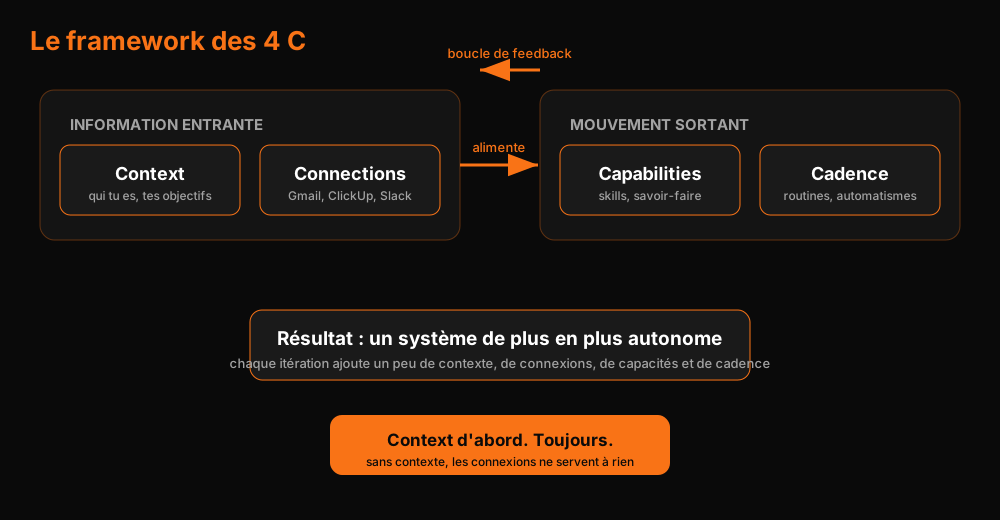
The first two C's are incoming information. The last two are the outgoing motion. You build in a loop: more context, more connections, more capabilities, more cadence. At every iteration, your system becomes a little more autonomous.
The ordering rule: without context, your connections are useless. An agent plugged into your inbox that doesn't know who you are, what you sell, or how you reply will produce noise. Context first. Always.
The trap of the do-everything agent
The number one beginner mistake is trying to create ONE agent that handles everything. A single bot with dozens of missions. Result: it gets confused, it delegates poorly, quality drops.
The structure that works is an org chart:
- You at the top, talking to 2 or 3 executives.
- The executives (chief of staff, COO, CFO, CMO) who know your strategy and delegate.
- The operators who do one thing very well: email triage, ClickUp, X monitoring, visuals.
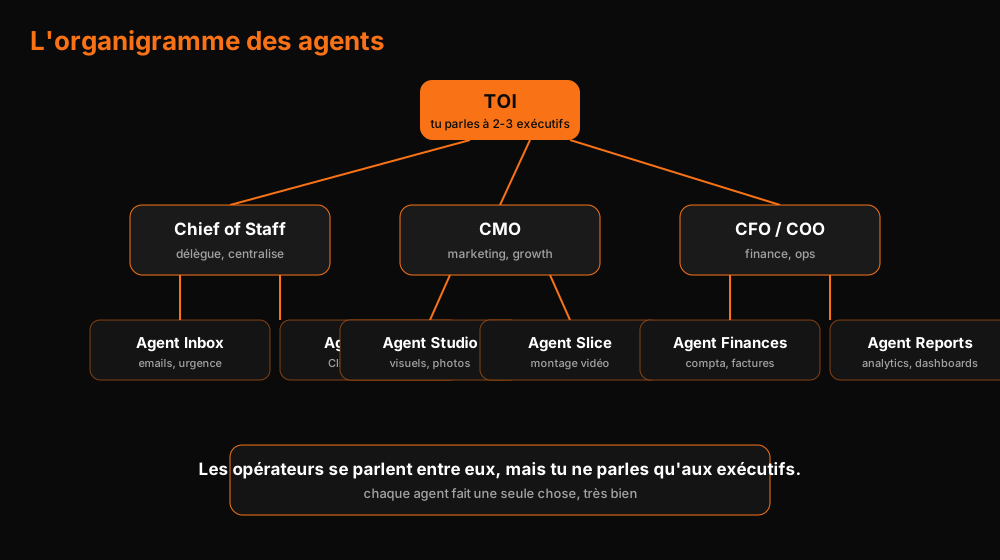
Why this hierarchy? Because a specialized agent becomes excellent in its domain. Because an operator doesn't need to know your growth targets to triage emails. And because you don't want to manage 15 conversations: you want to manage 2, and let the executive distribute the work.
Agents still talk to each other. If your email agent needs CRM data, it goes and gets it directly. But you're no longer the central node of everything. You're the strategist.
Full setup in 10 minutes
Here's the exact path, the one I follow with a brand new account:
- Open grokbot.com, download the desktop app and the mobile app.
- Upgrade to the SuperGrok plan, $30/month.
- Connect your favorite tools. Google Workspace first, that's where your business lives.
- Create your first agent. Call it "chief of staff", this will be your main interface.
- Give it context in natural language: who you are, your business, your goals.
- Paste a link to an internal document (your knowledge base, your pricing, your processes).
- Authorize the Google Drive connector with one click. No API to wire up.
- Verify the agent memorized the info by asking it a question.
That's it. You now have an assistant that knows your business. It can't do much concrete yet, but the foundations are set.
Pro tip: when you connect multiple accounts of the same service (two Gmail, two ClickUp), name each connection. "Work", "Personal". Without that, your agents log into the wrong account and data goes in the wrong direction.
A word on security: never paste a password into a conversation. When an agent needs you to do a sensitive action, the workflow pauses and waits for your hand. That's human takeover. Use it, don't put your secrets in the history.
Creating your specialized agents
Your chief of staff is nice. The real potential is in the operator agents. Take your biggest bottleneck, and create an agent for it.
For most SMBs, it's the inbox. Here's the brief I give my inbox agent:
"Your only job is managing client emails. Triage, urgency, replies. You create drafts, you never send without validation. Here are the business facts and the price list."
Then the quick workflow:
- Let it read the inbox and propose. It will suggest labels, automations, priorities.
- Approve what makes sense, reject the rest. You can outsource the thinking, not the understanding.
- Iterate on its mistakes. Every correction, you give it as feedback, it updates its instructions.
In my case, the agent proposed 6 labels (urgent, needs you, quote, schedule, billing, warranty), a triage every 30 minutes, and drafts for typical replies. In 10 minutes, I had a system watching the inbox, tagging what came in, and prepping responses to urgent emails. Without sending the first email without my approval.
Scoop: the real value isn't the automated reply. It's the promise "no urgent email ever ignored again". Every urgent client gets an answer in minutes, even on a Sunday night.
The bike method
Call it the bike method. You don't let go of the handlebars on the first try. You hold the saddle, you run alongside, you give feedback: "you misclassified this one", "this reply should have been firmer". And every lap, the agent updates its instructions.
The people who create 15 agents on day one, without testing them, are the ones who wake up to wrong replies sent to wrong clients. Pause, lesson, iterate.
Skills, the real value-add
A skill is a recipe. The day your agent produces a deliverable you want to reproduce identically, you turn that process into a skill. It becomes a reusable instruction for any agent, anywhere in your system.
A good skill contains:
- When to use it (the description, so agents know when to pick it)
- The exact order of operations
- The pitfalls: what to check, what can go wrong
How to create a skill
Two ways:
- Natural language. Describe the process precisely, including the expected deliverable. This is my preferred method, it's flexible.
- Teach a task. You record your screen while you do the action. The agent watches your demo and turns it into a skill. Handy for browser flows (downloading a report, filling a form, configuring a tool).
Pro tip: always give your skill a precise definition of done. "Generate a report" means nothing. "Generate a Google Sheet with total emails per label, average response time, and a chart per label, in brand colors" means everything.
And when the brief is complex, say: "ask me questions until you understand". The agent will interview you, and the result will be ten times closer to what you imagined.
The endless iteration
Skills and routines improve. My inbox agent generates a weekly report on Google Sheets. The first version was ugly: right data, zero form. I asked for green in brand colors and a chart. It fixed the report AND updated the skill. The following Friday, the report came out already formatted.
That's the Claude skills pattern: knowledge gets stored, improved, reused. After a month, you have a library of recipes that run themselves.
Connections, where everything passes through
Native plugins cover the essentials: Google Drive, Gmail, Calendar, Slack, ClickUp, X, Fireflies, Granola, Fathom, Clay. You click "connect", you authenticate, done.
But the real superpower is Composio. It's a gateway to over 1000 applications: YouTube, LinkedIn, QuickBooks, Perplexity, and hundreds more. You connect once, all your agents access it. Connections are universal, memory stays individual.
Connections I actually use:
- Fireflies for meeting transcripts, archived every evening
- X for monitoring and the weekly post recap
- ClickUp to log every agent action
- KIE AI via Composio for image models beyond the native offering
Watch your consumption: some plugins count against your weekly usage. The X plugin, for instance, runs around half a cent per post on a daily recap. Not huge, but it adds up if you multiply routines.
Pro tip: for image models, don't limit yourself to Grok Imagine. You can connect KIE AI (via Composio or directly in the agent's browser) to use GPT Image 2, Google Imagen, or other models. Your agent will learn to navigate the interface, and you can ask it to save that flow as a skill.
Routines, your team that works at night
Skills are the knowledge. Routines are the action triggered in the background. There are two types of triggers.
Time-based
A time, an interval. Every 30 minutes, every Friday at 5pm, every evening at 6pm.
Event-based
A Slack message, a form, a webhook. Think of someone ringing your doorbell: the event arrives, the agent wakes up and acts.
A webhook sounds scarier than it is. A form is submitted, a webhook rings, the agent receives the payload data and acts. Real example: a contact form that triggers a confirmation email, an assigned ClickUp task, and an internal notification. All of it with zero human keystrokes.
Routine examples that genuinely change lives:
- Inbox emergency watch: check every 30 minutes, ping if urgent. Everything else waits for the morning review.
- Weekly email report: Friday 5pm, the analytics report goes out automatically.
- Meeting transcript dump: every evening at 6pm, meeting transcripts move into a shared folder, sorted by month.
- Slack trigger: a message in a channel wakes an agent that answers with internal data.
- AI daily brief: every morning, a recap of your X or LinkedIn monitoring lands in a ClickUp DM.
Agents that collaborate
This is where the system gets fascinating. Your agents talk to each other, mention each other, delegate work to each other.
Example: you have a CMO. Under it, Studio (visuals) and Slice (video editing). You tell the CMO "prepare a sizzle video for the website". It briefs Studio to generate visuals, it briefs Slice to edit, it supervises, it hands you the deliverable. You talked to one person.
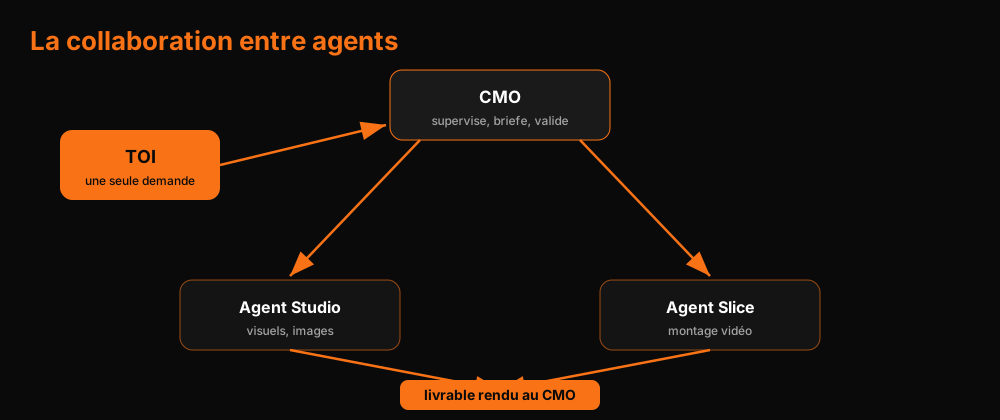
For collaboration to work, two conditions:
- Precise descriptions. Every agent must state what it does, in its description. That's what other agents read to know who to contact.
- Structured memory. There's a global memory (all agents see it) and individual memories (specific to one agent). An operator doesn't need your Q4 targets. An executive does.
Check regularly what each agent knows about you. Ask: "what do you know about me?" Side by side, you split what should be global and what should stay local.
Group chats are perfect for executive meetings. Every week, ask them: "what happened? where are the bottlenecks? which agents should we create? which skills are missing?" They brainstorm together, each from its vertical, and bring back concrete decisions. You decide, they execute.
The agents' computer
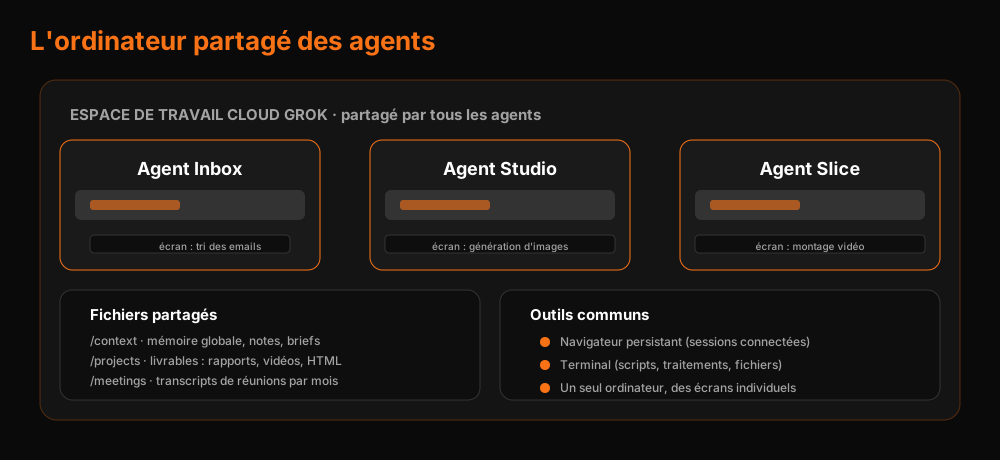
Each agent has its own screen, but they share the same computer in Grok's cloud. With its browser, its file explorer, its terminal.
What this unlocks:
- The persistent browser: log in once to your online tools, all agents use the session.
- The shared file manager: deliverables (reports, videos, HTML) live in a common workspace, accessible to every agent.
- The terminal: they can run scripts, process data, manipulate files.
- Local file access: with your approval, they access files on YOUR machine. The agent can analyze a PDF in your Downloads, rename it, move it.
Treat your local space as a knowledge base. Create "context" and "projects" folders. Ask your agents to systematically store their deliverables and notes there. It's the shared brain of your system.
Keeping control
An autonomous system with no oversight is a nest of problems. Four habits to install:
-
Agent logging is non-negotiable. Everything your agents do must be logged somewhere: ClickUp, Google Sheets, a SQL database. Turn that into a skill: each agent creates its task, updates its status, archives when done. You keep visibility, and at the end of the week you know exactly what got done.
-
Check the runs. Run history shows whether your routines actually fire. Failure? You see an X. Dead routine? Reactivate or delete it.
-
Targeted notifications. Enable notifications only for your 1-2 critical agents. The rest can wait. And set your notifications to hit your phone: you pilot from your pocket.
-
Watch your weekly usage. Every account has 100% weekly usage, resetting every 7 days. A group chat of agents consumes more than a single conversation. You can raise the cap or buy on-demand credits. Look at that counter before multiplying routines.
Control also means not outsourcing understanding. Your agents' recommendations are suggestions, not orders. You never ship anything you haven't personally verified at least once.
Bot templates, the market that's coming
You can share a bot as a template, with its skills, its routines, its memories. And import bots created by others. This will create a Grokbot template market, exactly like the n8n template market, the Claude skills market, the workflow market.
A few caution rules:
- Inspect the context before importing. Read the description, the memories, the integrations. You don't know what the creator put inside.
- Expect some setup. An imported bot comes with skills and routines, but not your connections. You'll re-connect your accounts, that's normal.
- Think about monetization. If you build a bot that's genuinely useful to your process, it's worth something to others. People already share, publish, and sell these templates.
Monetization, the next level
Last part, possibly the most profitable: Grokbot as a service offering.
You have an AI agency, or you want to start one? The Grokbot setup is the perfect door-opener. Here's the value ladder I recommend:
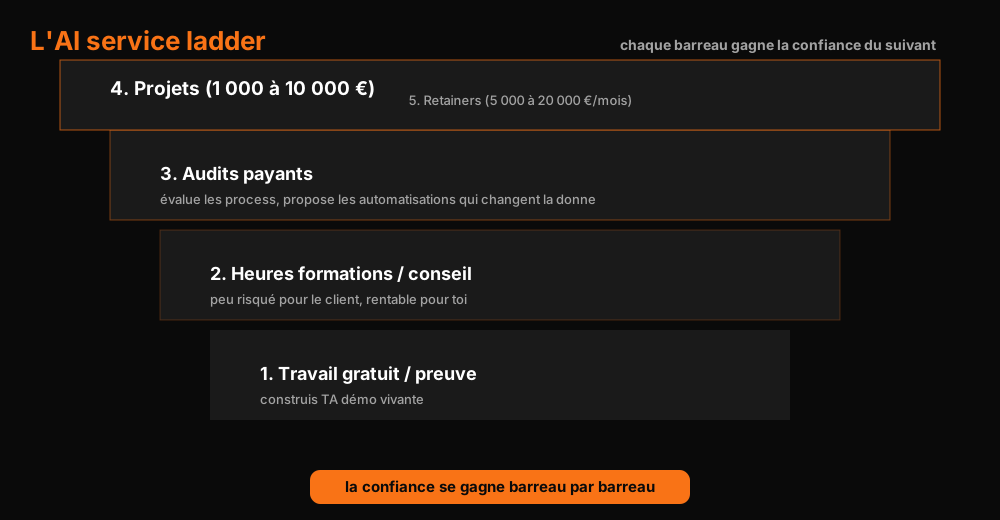
- Free or cheap work, to build your proof. Your own Grokbot system is your living demo.
- Training and consulting hours. You teach a team to use Grokbot. Low risk for the client, profitable for you.
- Paid audits. Once trust is established, you evaluate processes and propose the automations that move the needle.
- Projects ($1,000 to $10,000). Full agent ecosystem implementation for the client.
- Retainers ($5,000 to $20,000/month). You become their outsourced AI director.
You don't sell a $10,000/month retainer to a stranger. You first sell a few hundred dollars setup, a training session, an audit. That's the ladder: each rung earns the trust for the next.
Your best sales argument is yourself. A 2-person agency producing like a 10-person team because its agents run 24/7 is a more powerful demo than all your slides.
And to feed your business, the three P's. Person (who is your client), Pain (what's blocking them), Promise (how you solve it). Your agents enrich leads, write outreach messages, schedule sends, analyze responses, and improve the process every day. A self-optimizing prospecting pipeline is any agency's dream.
Where to start tomorrow morning
You want to act? Here's your weekend roadmap:
Saturday morning: create your SuperGrok account, connect Google Workspace, create your chief of staff. Give it the link to your knowledge base.
Saturday afternoon: create your first operator agent. The one that attacks your biggest bottleneck. The inbox, almost always.
Sunday morning: create a routine. An urgent check every 30 minutes, a weekly report. Test, iterate, fix.
Sunday evening: install agent logging. Everything your agents do must be traced. You sleep well, the system takes over.
The next morning, you open your phone with the same question in mind: what got done while I was sleeping?
The difference between you and someone who watches Grokbot go by is that question. And the answer is yours to build.
Want an acceleration boost on your processes? Book your AI audit. I'll look at where your agents make you money, and where they lose it.
New AI term along the way?
Clear, jargon-free definitions for business leaders.
Take action: your Express AI Audit (45 min)
45 minutes with an AI expert to evaluate your operations, identify productivity gains and map your first high-ROI AI agents.
Designed for SME leaders (10 to 100 staff) · No commitment · 100% IP ownership
Deploy AI Agents in your SME with an External CAIO
Get an outsourced AI Director 1 to 10 days per month to audit, automate your workflows and train your teams.
Stay ahead of AI Innovations
Every week, get a curated selection of our latest articles, case studies, and actionable AI insights directly in your inbox. No spam, 100% value.
Fractional AI Director locations