I replaced my whole marketing team with Claude Code

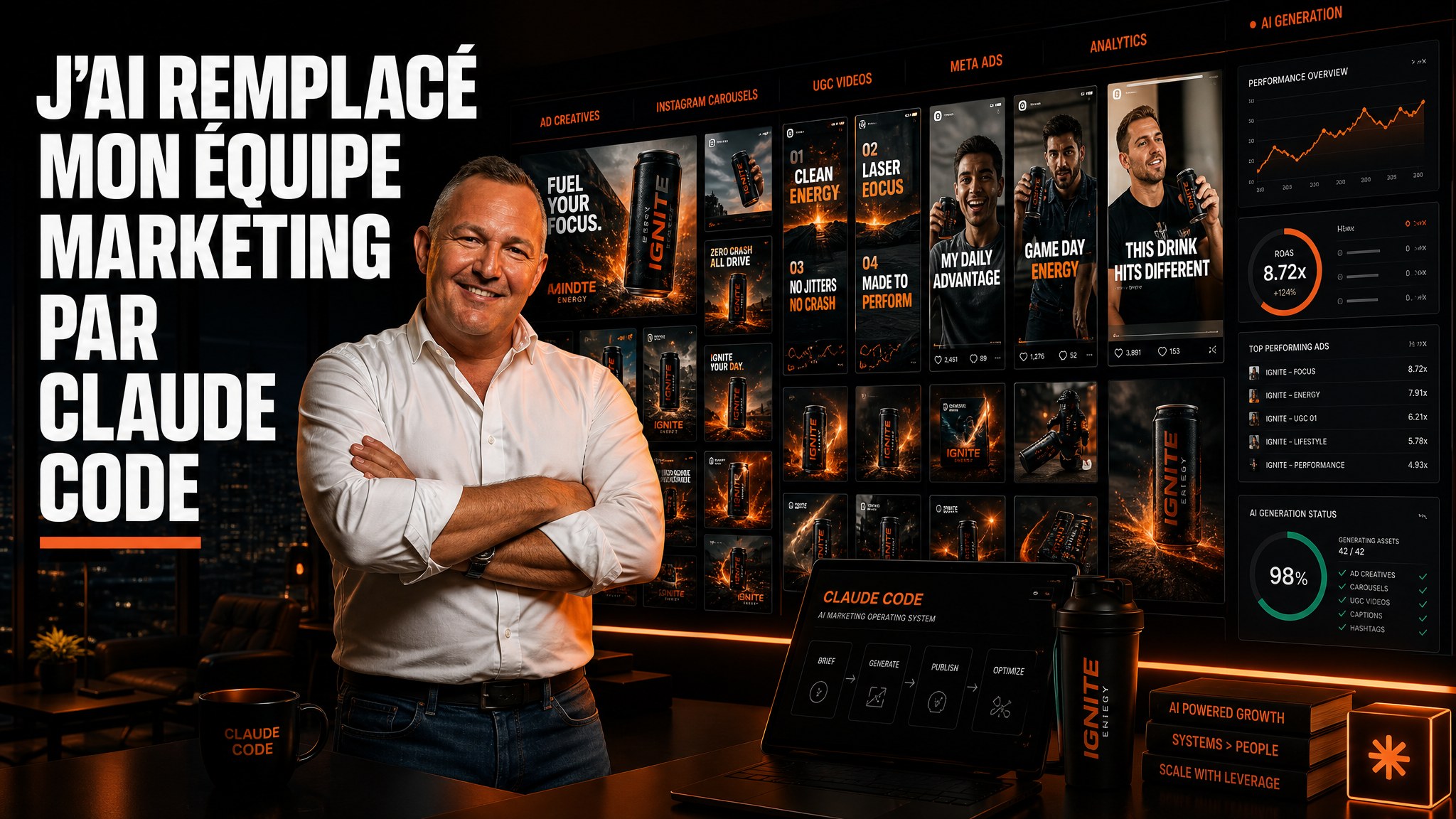
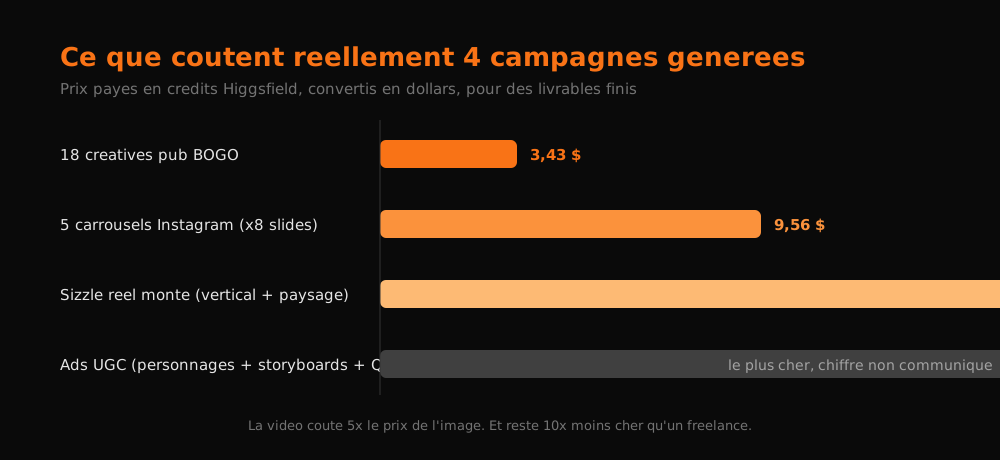
18 ad creatives ready to launch: $3.43. A fully edited sizzle reel with music, vertical and landscape: $17.55. Five Instagram carousels of 8 slides each: $9.56.
I didn't hire a team for this. I created an empty folder on my Desktop and talked to Claude Code.
The 3 Ps: without them, you'll produce generic slop
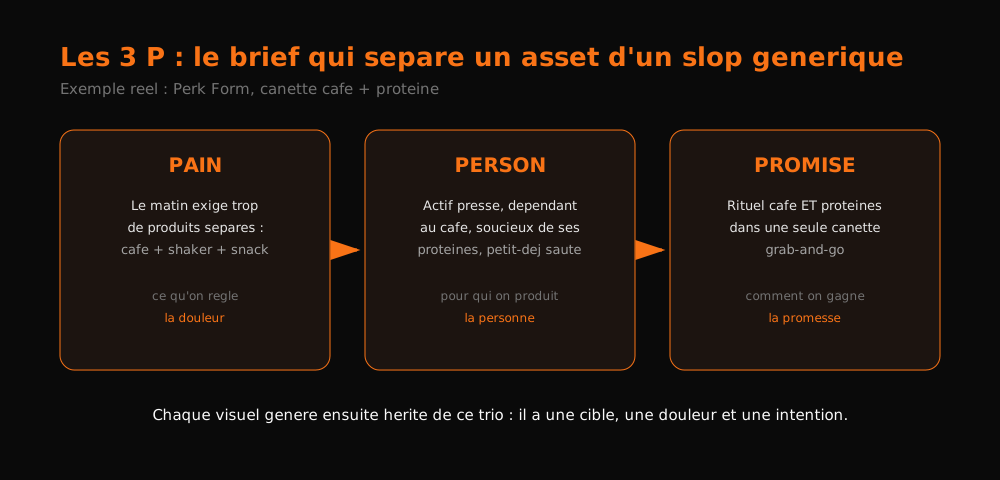
Before touching any tool, you need three things. I call them the 3 Ps: pain, person, promise.
- Pain: what problem does your product actually solve?
- Person: who concretely suffers from that problem?
- Promise: how does your brand promise to make it disappear?
The example I built everything on: Perk Form, a fake coffee-and-protein energy drink brand (vanilla latte, salted caramel and bold mocha flavors). The person is a busy professional who runs on coffee, watches their protein intake and skips breakfast. The pain: mornings require too many separate products, coffee + shaker + something portable. The promise: the coffee ritual AND the protein in one grab-and-go can.
This trio is what keeps your assets from looking like anonymous AI content. Every visual generated afterward has a purpose behind it. Without it, you get clean but interchangeable images that sell nothing.
Scoop: that's also exactly what a good freelancer bills you a day rate for. Making them fill out a 3-field form before producing isn't bureaucracy. It's the entire brief.
Setup: 10 minutes, zero code
You don't need to code. No video editing, no photo retouching. You just need to know how to ask. Here's the full sequence.
- Create a Higgsfield account and pick a plan. It's the aggregator: Seedance 2.5 (early access, exclusive to them), GPT Image 2, Nano Banana, Grok, Kling, Gemini, Sora, Flux, all under a single subscription. Plus a built-in Marketing Studio.
- Install Claude Code desktop (Google "Claude Code desktop", download your OS version). Does the word "code" scare you? Forget it. We're not writing a single line.
- Create an empty folder on your Desktop, say
perk-form-marketing. - Open that folder in Claude Code: Open folder button, select it, then Trust the workspace (it can read, add, move files).
- Dump your brain in natural language: "My name is X, I run this business, here are my 3 Ps, you'll be my marketing team: ads, website, UGC. Create a CLAUDE.md and any context files you find relevant."
- Drag your existing assets into
assets/: logos, product photos, brand guideline PDF if you have one. - Connect Higgsfield (see below).
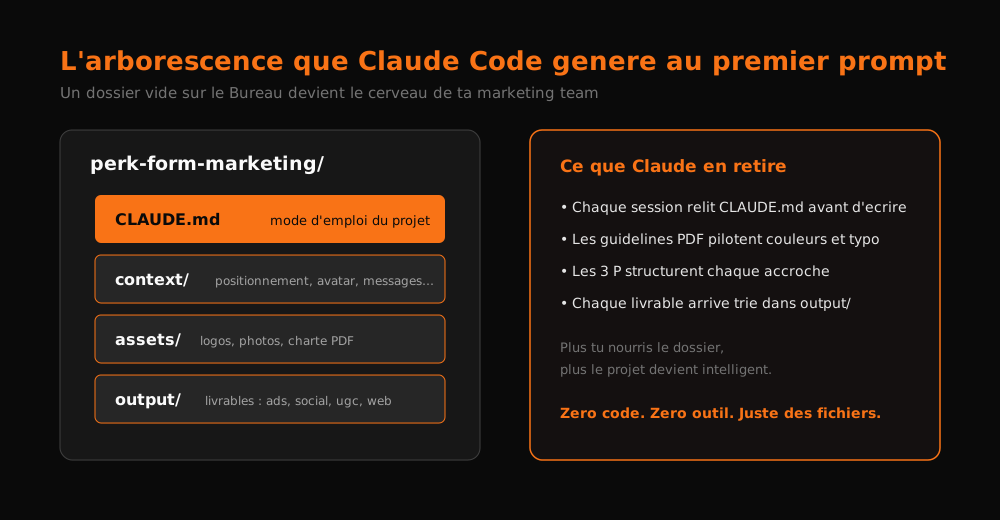
Step 5 makes all the difference. Within minutes, Claude Code builds a complete structure: a CLAUDE.md (the operating doc every future session re-reads), a context folder with brand positioning, the 3 Ps, the customer avatar, product facts, voice and copy, a message bank, playbooks, a competitive landscape, plus assets and output folders ready to receive your source files and its deliverables respectively.
Two habits to adopt right away:
- Watch the Files tab (three dots, then Files): you see every file being created live. Reassuring when you start.
- Keep feeding the CLAUDE.md. Learn something about your market? "Add that to the CLAUDE.md." The project gets smarter every session. That's the real magic of Claude Code over web chat: it works from a directory, not from a memoryless window.
The "Grill Me" skill: extract what you can't articulate
Don't know what to put in the context? There's a skill for that, and it's gold.
A skill is a reusable recipe: just a markdown file dropped into the project. "Grill Me" principle: the agent relentlessly interviews you about every aspect of your topic until you reach shared understanding. Question after question, until everything in your head is in theirs.
How to use it: grab the .md file, drag it into the chat, "install this skill in this project", then "run Grill Me on my product and my marketing". It asks questions one by one and saves the interview. Result: a context folder you'd never have written yourself in a day.
Always verify what Claude actually sees
A trap hit on day one: I dragged an 11-file product shots folder into assets, and the interface displayed the folder weirdly, like unreadable.
Reflex: just ask. "In the assets folder there should be 11 product shots, do you see them?" Claude reads the disk, lists all 11 files, confirms. It was a display bug, nothing more.
The lesson matters more than the anecdote: the UI can lie, the filesystem can't. When doubt appears, have it inventory the files before launching anything.
Connecting Higgsfield to Claude: 2 minutes
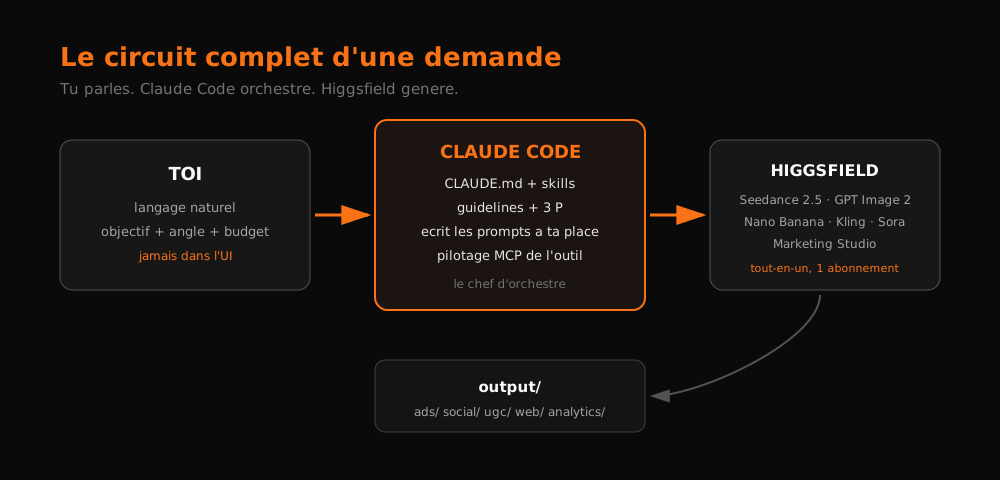
Why wire up Higgsfield instead of clicking there yourself? Because once connected, Claude writes the prompts, picks the models, navigates the interface and files the deliverables. You never set foot in the UI again.
The steps:
- In Higgsfield, click the MCP & CLI button at the top.
- Copy the Claude connector URL (first in the list).
- In Claude Code: Customize → Connectors → Add custom connector, paste the URL, name it "Higgsfield".
- Click Connect, sign in to your Higgsfield account, allow access.
That's it. Now "make me an image" or "go to the Marketing Studio" happen on their own.
The scroll site that doesn't look AI-made
First big deliverable: a product site. I used Scroll World, an open-source GitHub repo that builds immersive sites where everything reveals on scroll (GitHub is just a place to store and share code; you copy the repo URL and paste it into Claude Code, done).
The prompt fits in one idea: "use our logos, guidelines and product shots already in the project, combine them with this repo, and design the structure and copy around our 3 Ps".
Result in a single pass:
- The design system comes straight from the guidelines PDF, not invented. Colors, typography, logo system, all there.
- The site opens on the pain, not the product: "Your morning shouldn't require two drinks."
- On scroll, coffee and protein merge into a single can. Then "11 minutes before you leave": the shower, keys, one email, breakfast, coffee. A sequence that speaks exactly to the persona.
- Each flavor gets its own section with generated video (Seedance 2.5 via Higgsfield): condensation close-up on bold mocha, spinning vanilla latte can. Clips play forward as you scroll.
Is it perfect? No. Nutrition facts were missing (I hadn't provided them, so there are gaps to fill), and it needs iteration. But for a single prompt, it's incomparably less generic than standard vibe-coded fare.
Important detail: the site runs locally (localhost:8931). Nobody else can see it. To publish: push the repo to GitHub, then deploy to Vercel. Five minutes, once you get it.
Four campaigns launched in parallel, like delegating to four juniors
Same chat, four prompts fired almost simultaneously. The principle: give the motivation, the end goal, where to store deliverables, and always ask for the cost at the end.
Campaign 1: BOGO ad creatives
"We have a big sale coming: buy one box get one free, mixed box or single flavor. Generate tons of different creatives to test, varied copy, varied images, using our brand context. Tell me what it cost and put everything in a summer-bogo folder."
Delivery: 18 finished creatives, branding fully consistent (the guidelines do their job), surprisingly varied angles for such a short prompt. A few examples: "Two drinks, one can", "Breakfast optional", "Stock the whole summer", "Can't pick? Don't.", "Gym bag to desk. The shaker stays clean.", "Same habit, more return", "Cold case handled", "Bold mocha, doubled". Some use a ruler-grid motif reminiscent of a shaker bottle. And crucially: a few blank versions with no copy, ready for my own text.
Total cost: $3.43.
Campaign 2: the sizzle reel
"Create a viral sizzle reel for our site and socials, go through Higgsfield's Marketing Studio: music, pace, dynamic edits."
Delivery: two edits (vertical and landscape), chained scenes, music, graphic elements, embedded copy. Zero creativity required from me. Only flaw spotted: one slightly off logo in a scene.
Cost: $17.55. Video costs real money, five times the price of images. Still compare it to a freelance editor for a reel of that quality.
Campaign 3: Instagram carousels
"Launch our Instagram presence: a few carousels about why we built this product, who it's for, what problems it solves, the flavors. Suggest which ones we should pin. File everything properly and give me the cost."
Delivery: 5 carousels of 7-8 slides each, same visual universe, distinct angles ("Your morning shouldn't require two drinks", "Coffee happens because coffee always happens", "Same habit, one less stop", "Three flavors of coffee that pulls its weight").
Cost: $9.56.
Campaign 4: UGC ads, the most impressive one
"Create several vertical UGC-style video ads, very organic feel: people holding the product, testing it, saying what they like. Must fit the persona and answer the pain. Mix edited versions and raw takes. Seedance 2.5 if you want, but try other models too."
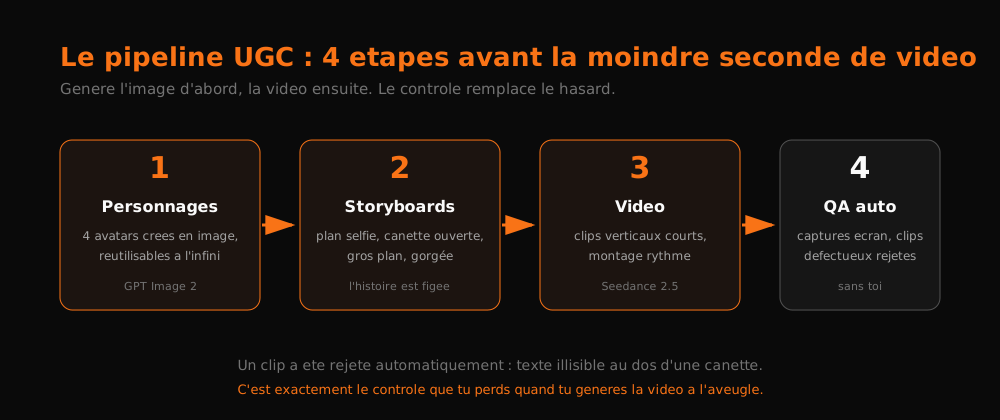
And watch the pipeline Claude unrolled on its own:
- It first created 4 characters as images (GPT Image 2), reusable at will. If you want a recurring face on your page, your brand avatar now exists.
- Then storyboards: selfie framing facing camera, coffee cup and protein shaker on the counter, opening the can, close-up, first sip. The story is locked frame by frame BEFORE video generation.
- Only then the videos, far more controlled thanks to the boards. Fast social-media-style editing, 1-to-2-second clips.
- Finally, an automatic QA pass: screenshots of every clip, verification, one video rejected because the text on the back of the can was unreadable. Before delivering anything to me.
My honest take on these UGC ads: the output looks realistic but you can still tell it's an AI avatar, and it still feels too much like an ad, not organic enough. The fix is known: analyze real viral UGC in the niche, have a human approve scripts first, then send scripts and storyboards to generation. And note this: those generations ate the most credits of the batch, because images + storyboards + multiple QA passes add up.
The Excel tracker: where it becomes a machine
Four waves of generations later, a fifth prompt: "create an Excel file logging date, generation type, campaign, channel, primary angle, deliverables, tools and models used, credits and dollars spent, status. I want to analyze which angles work best."
Eight minutes later, the file lands in output/analytics/. And the detail that made me smile: the spreadsheet is styled in brand colors. Tabs, header, everything follows the chart. It literally used my design system for an Excel file.
The generated tabs:
| Tab | Content |
|---|---|
| Generation log | ID, date, type, campaign, channel, primary angle, angles covered, deliverables, number of generations, tool/model (GPT Image 2, Nano Banana Pro, Marketing Studio, Seedance 2.5...), credits, dollars, status |
| Creative assets | Every image/video with its supporting copy |
| Angle performance | To be filled with actual performance data |
| Copy bank | Every hook and text produced |
| Cost summary | Running spend total |
From there, extensions are obvious: "update the sheet" after each new batch, a weekly automatic sweep, an idea drop zone ("check the sheet and process new rows"), even automated research scraping competitor creatives weekly to feed the idea bank.
The loop that makes the system unbeatable
Here's the real unlock, beyond simple savings: once Claude generates your assets, plug performance data into it. Every week, it re-reads what it produced, compares against results, and produces more of what worked.
Volume negates luck. The more creatives you generate, the more you hit, and the more data you have to refine your aim. A human produces 3 creatives a day; the system produces 18 during your coffee break.
Rules to copy as-is
- Write your 3 Ps before anything else. Pain, person, promise. No brief, no system.
- One folder = one business. The project gains intelligence every session, unlike a throwaway chat.
- Always ask for the cost at the end of a run and impose a named output folder. You keep budget control.
- Require blank versions in every creative batch. Copy changes in 2 seconds; regenerating an image costs money.
- Recycle your winners. Performing copy? Apply it to all 18 visuals. Performing visual? Just swap the CTA.
- Never generate UGC video without going through images then storyboards. Control replaces chance.
- Systematize QA. Screenshots, rejection of defective clips, before human delivery.
- Track every generation: date, angle, cost, model. Without data, no loop.
- Inject your domain expertise into prompts. I used none here and results already hold up; add yours and they level up.
- Expect to iterate. First pass = raw material. Fill in missing info (nutrition facts, pricing, availability), correct, rerun.
What this really changes
Setup took half a day, most of it explaining my business to an empty folder. Since then, every campaign is a three-prompt conversation.
The skill is no longer editing videos or designing visuals. It's the brief: knowing how to phrase a pain, a person, a promise, and letting the machine run.
And no freelancer will ever bill you $3.43 for that.
New AI term along the way?
Clear, jargon-free definitions for business leaders.
Take action: your Express AI Audit (45 min)
45 minutes with an AI expert to evaluate your operations, identify productivity gains and map your first high-ROI AI agents.
Designed for SME leaders (10 to 100 staff) · No commitment · 100% IP ownership
Deploy AI Agents in your SME with an External CAIO
Get an outsourced AI Director 1 to 10 days per month to audit, automate your workflows and train your teams.
Stay ahead of AI Innovations
Every week, get a curated selection of our latest articles, case studies, and actionable AI insights directly in your inbox. No spam, 100% value.
Fractional AI Director locations