You're Using 10% of Claude: 10 Hidden Tips


You're using 10% of Claude.
Not because you're bad at it. Because the other 90% is hidden in menus nobody opens, behind settings nobody checks, and in habits nobody adopts.
You've connected Claude to your tools, you organize your conversations into projects, you structure your prompts. You're already doing better than most people. And you're still missing the features that actually change how you spend your time.
I've tested dozens. Here are the 10 that matter, from the simplest to the deepest.
1. There's a hidden App Store inside Claude
Plugins. The most underused feature of the entire ecosystem.
Settings, bottom left, Plugins tab. You'll find complete packs: tools, commands, connectors, sometimes entire skills. Installable in one click.
The clearest example: the PDF Viewer plugin. Once installed, type /viewpdf in any conversation, and Claude annotates, edits, fills your PDFs. It even triggers itself when your request matches the keywords. The slash command is for when you want to be 100% sure.
And there's something for everything: sales, customer support, HR, finance. Plus the partners: Canva, Slack, and the whole ecosystem of tools you already use, preconfigured to work well with Claude.
The rule: before wiring a new tool by hand, check if a plugin already exists. It saves hours of tweaking. Only constraint: some plugins require the desktop app. It's free, it downloads in 30 seconds.
2. Import your memory from ChatGPT
The classic objection from ChatGPT regulars: "all my history is there, two years of conversation, it knows me inside out, I'm not starting from zero."
You don't have to start from zero.
Settings → Capabilities → Memory → "Start import." Claude generates a prompt to copy-paste into ChatGPT (it also works with Gemini, Grok, Mistral, or Copilot). That prompt asks the other LLM to reformulate everything it knows about you: your preferences, your projects, the way you work. You paste the result into the import window.
Two minutes on the clock, and Claude has rebuilt its memory from your history.
Then, the habit nobody adopts: go see what Claude remembered about you. Everything is visible line by line. Correct, delete, add. It's your profile, clean it up.
3. Incognito mode exists
A gift for your partner, a personal health question, a business idea you want to test without polluting your profile.
The little ghost icon, at the top of the chat. One click, and the conversation goes incognito: no trace in history, no entry in memory.
And for the opposite case (information already exchanged that you don't want memorized), the solution is even simpler: say "Don't remember this." Claude manages its memory on demand.
4. Find your old conversations in 3 phrases
The real problem for most people isn't that Claude forgets. It's that they lose the information.
That conversation from 3 weeks ago where you finally got the answer you were waiting for. That point-by-point action plan you never found again, despite 20 minutes of scrolling. Result: you ask the question again from scratch, and the answer is worse.
Claude can search your conversations for you. Three phrases that work every time:
- "Pick up where we left off on [project]."
- "What did we decide about [topic]?"
- "Find me the plan you made for [task]."
And ask for the direct link to the conversation: it gives it to you, you click, you're there.
5. Ask for the file, not the text
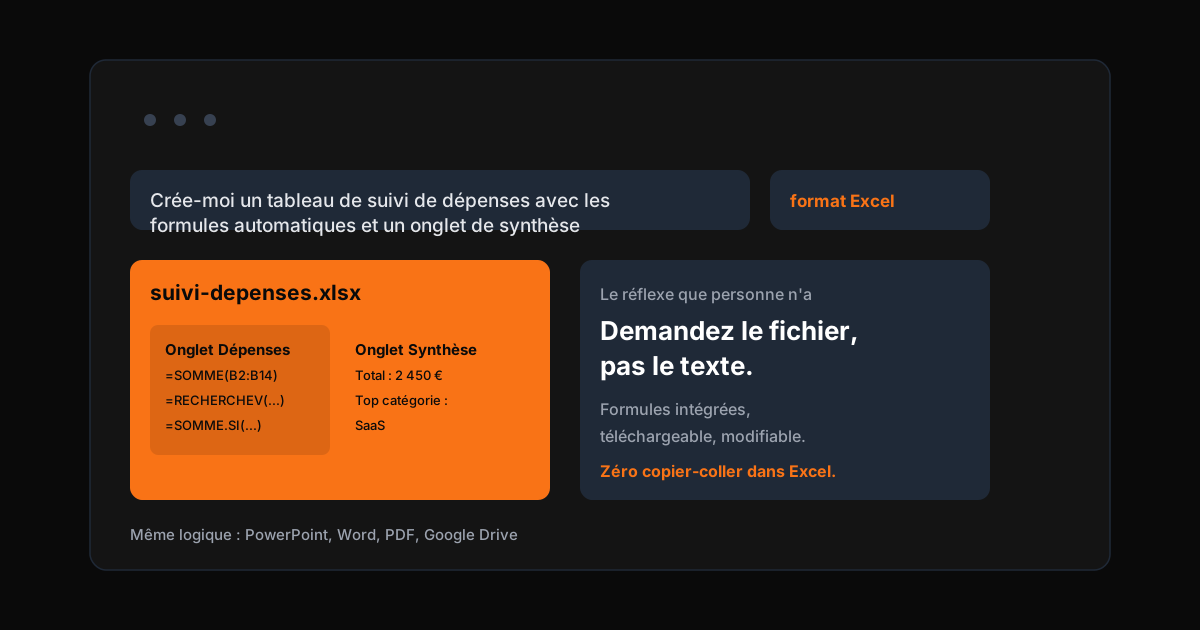
Everyone's reflex: generate text, copy-paste it into Excel, then spend 20 minutes fixing everything point by point.
Claude creates finished files. Directly.
"Create an expense tracking spreadsheet with automatic formulas and a summary tab, Excel format." You receive a real Excel file, formulas included. Same with PowerPoint (a document turned into a multi-slide presentation), Word, PDF, or straight onto your Google Drive.
The habit to adopt: never ask for text when you want a file. If document generation doesn't work on your side, check the box in Settings → Capabilities: without it, Claude creates no files.
6. Have your calendar audited against your goals
You connected your calendar to Claude. And what do you use it for? Summarizing your week? Knowing when the next meeting is?
Give it your quarterly goals. Ask: "Analyze the last two weeks of my calendar and check if they're aligned with my goals."
You get three things:
- A written analysis: the problem areas, the places taking too much time relative to your goals.
- A dashboard: real hours versus target hours, by type of activity.
- Concrete suggestions: recurring slots to delete, changes to make on your schedule.
The first time stings. That's exactly why it's useful. It works in your personal life too: two weeks of calendar against your goals, and you're facing reality again.
7. Ask Claude to audit how you use it
Your Spotify Wrapped, productivity edition.
Claude can analyze how you use it: your prompts, your habits, your contradictions. Condition: memory enabled (tip 2).
What it usually reveals: thinking processes that evolved without the system being updated, skills contradicting each other, topics where you go in circles. The typical recommendations:
- Spend 15 minutes a week updating the system.
- Structure a mini production brief before every big project.
- Audit the skills to eliminate contradictions.
The recap becomes an action plan, not a nice infographic you put away in a corner.
8. Create your own skills with Skill Creator
A task you redo every week. A recurring post format. A checklist always structured the same way. And every time, you re-explain everything to Claude in a rambling prompt.
Time to write a skill. A skill is a permanent instruction: your method, your rules, your structure, applied without having to specify them.
And you don't even need to know how to write skills. Anthropic created Skill Creator, available in the plugin catalog (Settings → Skills → Browse). You activate it, and Claude interviews you about your method. It asks questions, you explain, it formalizes. In 5 minutes, your way of working becomes an automation.
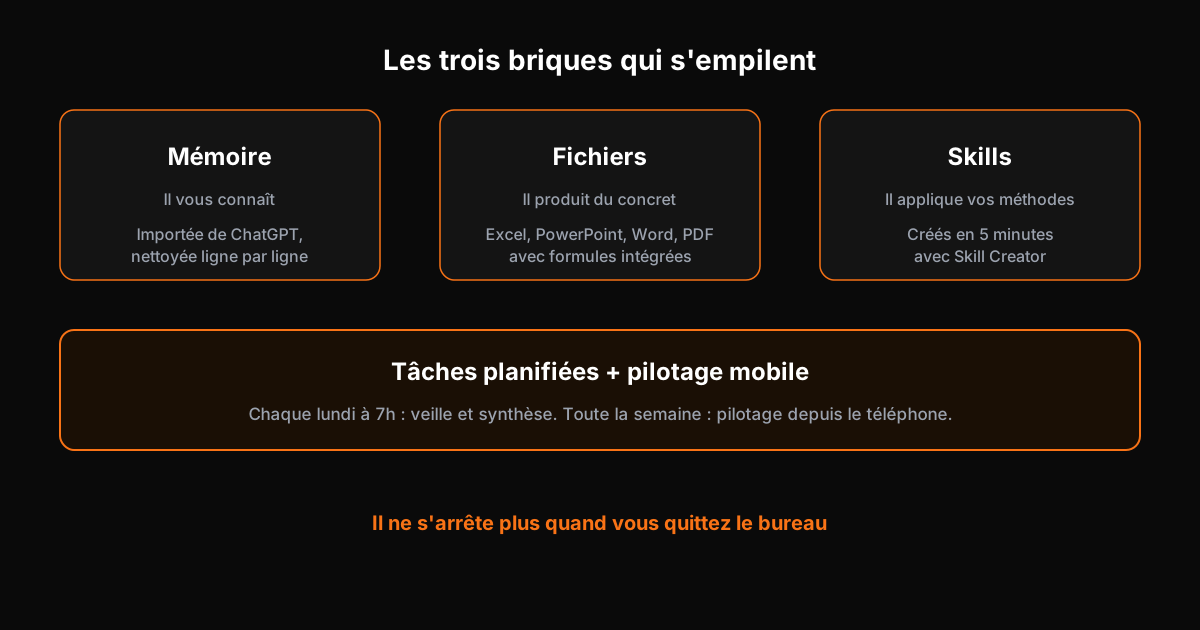
Memory, files, skills: three bricks that stack. Memory personalizes it, files make it concrete, skills teach it your methods.
9. Pilot Claude Code from your phone
The real shift is here. Claude has two execution modes: Cowork and Claude Code. The second goes much further.
And recently, it can be piloted from your phone. In your Claude Code session, type /remote-control, connect the session to the Claude mobile app (Code section). You see your sessions, open one, add a task: "replace the emojis with plain white logos." The task launches on the computer, and you can keep piloting from anywhere.
Only constraint: the computer must stay on. A VPS gets around it, but that's another level of complexity.
10. Schedule recurring tasks
Every Monday at 7am: search for news on your topics and summarize it. Every week: prepare the brief document for your Monday meeting.
Claude's scheduled tasks. Your assistant no longer stops working when you leave the office.
That's where 2026 tips over. We no longer chat with AI. We delegate tasks to it, automate a chunk of the work, and pilot the rest remotely.
Proof by example: an app, zero lines of code
While we were exploring these tips, here's what was happening in parallel: a specification prompt pasted into Claude Code, and the application building itself.
The result: a complete fitness and nutrition coach, with integrated AI. Goals checked, program generated automatically (leg day, detailed exercises), session tracking as you go. The link opened on a phone, tested in real conditions, without writing a single line of code by hand.
Sure, it still needs touch-ups. But that's not the point. The point is that a non-developer can now produce a working application while doing something else.
What you do this week
- Install one plugin. Just one. The PDF Viewer to start, or the one matching your line of work. Take 2 minutes.
- Import your memory. From ChatGPT or your usual LLM. Then clean it up line by line.
- Check the files box. Settings → Capabilities. And next time you need a table, ask for the Excel file.
- Audit your calendar. Two weeks of schedule against your quarterly goals. Note the slots to delete.
- Activate Skill Creator. A method you redo every week becomes a skill in 5 minutes.
The conclusion that stings
You're using 10% of Claude. That's not a reproach, it's a fact.
But the real topic isn't the tool. It's the piloting: knowing which brick to stack (memory, files, skills), which task to delegate, which task to schedule, and what to keep human.
That's exactly what I do for my clients: connect the memory, structure the skills, automate the recurring tasks, and train the teams so they don't start from zero every Monday. A Fractional AI Director is someone who knows 100% of the tool, and saves you the time you lose on the hidden 90%.
A free 45-minute audit to see where you stand. Most companies discover they're using 10% of what they already pay for.
See also the AI glossary
Browse the full AI glossaryTake action: your Express AI Audit (45 min)
45 minutes with an AI expert to evaluate your operations, identify productivity gains and map your first high-ROI AI agents.
Designed for SME leaders (10 to 100 staff) · No commitment · 100% IP ownership
Deploy AI Agents in your SME with an External CAIO
Get an outsourced AI Director 1 to 10 days per month to audit, automate your workflows and train your teams.
Stay ahead of AI Innovations
Every week, get a curated selection of our latest articles, case studies, and actionable AI insights directly in your inbox. No spam, 100% value.
Fractional AI Director locations