Claude Code for free: 1.3 billion tokens a month
 Gary Bramnik
11 September 2026 · 18 min read

Contents
- Why you burn tokens without knowing it
- Six habits that shrink the bill
- The style that kills back-and-forth
- The problem, like you're 5
- The fix, in one sentence
- Wait, how does that work?
- The right model for the right job
- What if you could code with no cap at all?
- How it works, like you're five
- Setup, in one block
- The NVIDIA key, and the others
- The whole system, in two commands
- Automatic failover, the real win
- Connect your MCPs
- If it breaks, it's one of these five
- Straight answers
- The limits to know before going all-in free
- FAQ: token management and usage
- What changes in practice
The weekly cap always hits at the worst moment. You're in flow, the code is moving, and then: "You've reached your usage limit." Nothing until next week. And for the record, Max plan costs $200 a month.
There are two ways to fix this. The first, nobody teaches you: spend dramatically fewer tokens. The second is more radical: stop being blocked by a cap at all, by pulling free tokens from elsewhere through a small proxy running on your own machine.
I'll show you both. First the habits that shrink your bill, then the full system for coding without limits on a stack of free providers. Every prompt, every command, all copy-paste.
Why you burn tokens without knowing it
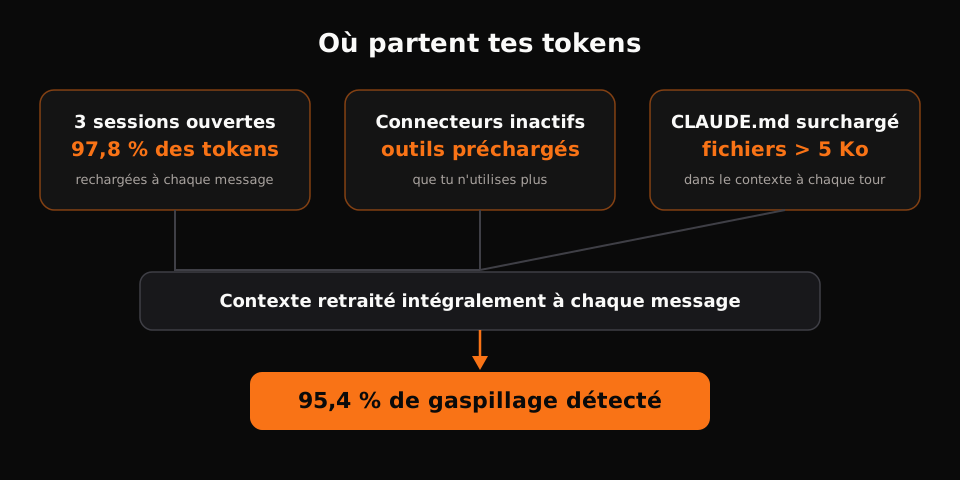
Before spending less, you need to know where it goes. What most people miss: every Claude conversation reprocesses the whole history on each message. A session that grew huge, three tool connections you no longer use, an over-stuffed CLAUDE.md: all of it is reloaded constantly.
You can measure your own waste with an audit prompt. Paste it into a session and it lists what gets preloaded (system tools, MCP servers, CLAUDE.md files, skills), reads your open sessions and estimates their real cost.
Audit my token usage and report where I waste tokens.

Phase 1: AUDIT
- List everything preloaded into a fresh session: system tools, MCP servers
  and how many tools each exposes, CLAUDE.md files, skills.
- Read my recent session logs and estimate the context size of each session.
- Measure every CLAUDE.md in scope (project and parent folders). Flag any
  file over 5K or any total over 10K.
- List sessions left open and give a cost estimate for each.

Phase 2: FIX
- Propose concrete removals: unused connectors, skills, files, habits.
- Apply what is safe, ask me before touching anything ambiguous.

Phase 3: HABITS
- Give me 5 habits to keep usage low over time.
For reference, an audit on my setup found 95.4% token waste. The heaviest line item? Three big sessions I had left open and forgotten about. That's the first reflex to adopt: close and purge finished sessions.
Six habits that shrink the bill
1. Clear between jobs, not compact
When a task is done, the natural reflex is to ask for a summary and keep going in the same window. Wrong move: compact forces Claude to re-read the whole conversation. Open a new tab and type /clear. The session restarts from a clean context, and you stop paying the dead weight of what came before.
2. One session, one model
Switching models mid-conversation makes it reprocess the entire history in a new context. You don't hop from Opus to Sonnet halfway through "for a quick question." One task, one model, start to finish. Same rule for effort level: don't touch it mid-run.
3. Batch your questions
Sending three separate messages is three full re-reads of the history. Dictate your whole train of thought at once, multiple questions in a single message, and the model processes the batch in one pass. It sounds trivial. It's huge over a day.
4. Fix the prompt, not the answer
You typed "tallest man" instead of "tallest woman", the model answered, and you send a follow-up correction. Bad habit: it lengthens the conversation and keeps the wrong answer around next to the right one. Click the pencil icon, rewrite the original message, and the history stays clean. This works in first-party chats; it isn't always available in code editors.
5. Text over PDFs and screenshots
An image runs about 5,000 tokens. Every screenshot you drag into the conversation carries that cost, reloaded on every message. Before pasting a PDF or image you'll reference repeatedly, pre-process it once into plain text.
6. Lock the effort level
Like the model, effort level doesn't change mid-session. Varying it means re-analyzing the whole context. Pick it at start, keep it to the end.
The style that kills back-and-forth
Nobody talks about the real drain: verbosity. When Claude answers in three paragraphs for a question that deserved two lines, you waste time decoding and re-prompt for clarification. Each clarification is one more re-read of the history.
The fix is a short communication style I call "explain it like I'm five," applied through a skill. It fits in four blocks, and you can give it to any assistant:
When you answer, structure your message this way:

## The problem, like you're 5
Explain the problem simply, no jargon, short sentences.

## The fix, in one sentence
One sentence, as plain as it gets.

## Wait, how does that work?
Three to five short paragraphs, concrete examples, zero filler words.

No needlessly long sentences. No "it should be noted." No.
The output is strikingly crisp. Clear answers mean fewer clarification questions, which means shorter conversations, which means fewer tokens. Two layers of savings: less of Claude's budget, and less of yours spent decoding.
The right model for the right job
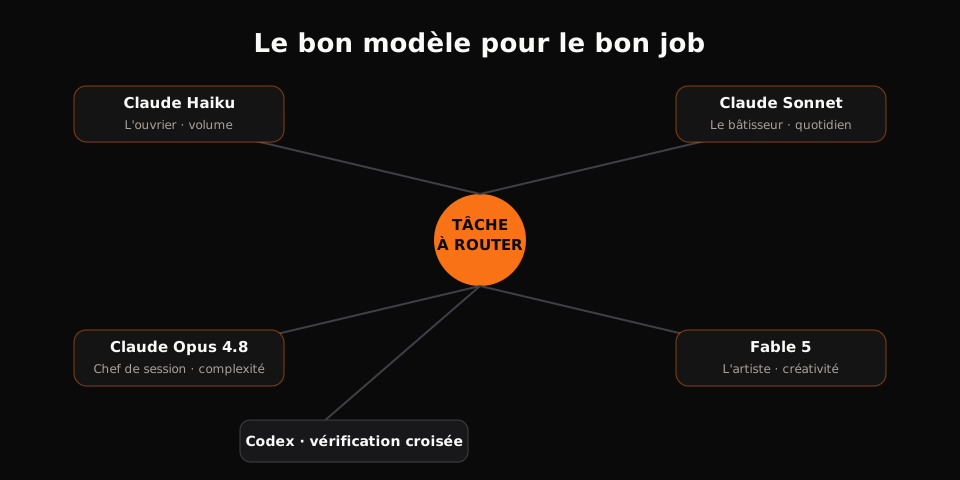
Most people keep one model in mind and use it for everything. That's the most common waste. Here's how I split work myself:
| Model | Role | Typical use |
|---|---|---|
| Claude Haiku | The grunt | Volume rewrites, boilerplate, repetitive edits |
| Claude Sonnet | The builder | General questions, daily development |
| Claude Opus 4.8 | The session driver | Complex logic, long sessions |
| Fable 5 | The artist | Big decisions, premium creativity, design |
And there's a player missing from that list: the second opinion. I systematically have my Claude work double-checked by another engine, Codex for instance. Claude can tell you everything is fine while an architectural error sleeps in the middle of the code. A single exchange with Codex has caught massive issues Claude missed. That second pair of eyes, for the price of a $20 monthly subscription, saves you from rebuilding a whole system after the fact.
For large codebases, I load GraphiPy before I even ask a question. The tool (100,000+ stars on GitHub) builds a map of the relationships between files. Result: I can ask precise questions without the model reading every line of the repo. It's one of my biggest token savings on sizeable projects.
Here's the routing logic, in one look.
What if you could code with no cap at all?
The habits above cut the bill, but a ceiling remains: even Max plan caps out weekly, and every request can only go to one company. Meanwhile roughly 50 providers hand out free monthly allowances to win developers: NVIDIA, Groq, Google, GitHub, Cloudflare. Alone, each free tier is a puddle. Nobody codes on a puddle.
An open-source project built a local proxy that pools those allowances: free-claude-code. It claims over a billion free tokens a month by combining the quotas of its ~50 providers. And you use it inside the Claude Code harness itself, keeping your skills and your workflow.
How it works, like you're five
The Claude Code harness has a built-in setting called ANTHROPIC_BASE_URL. It tells each request where to go. Anthropic built it so teams can point Claude Code at Bedrock, Vertex, or a company gateway. You point it at a proxy on your own machine instead.
- Claude Code sends every request to whatever address you configured. It's a documented setting. You're using it, not defeating it.
- The proxy sits at that address on your machine. It forwards each request to a provider you configured with your own API key, then translates the answer back into the format Claude Code expects.
- Nothing touches your Anthropic account. No Anthropic key, no login, no servers. That's exactly why it's free, and exactly why it can't get you banned.
- A tier runs dry mid-session? It fails over to the next provider automatically.
Why not just OpenRouter instead? It works, but it needs a card, it caps free models per day, and quotas burn fast. NVIDIA asks for nothing: they bet you'll end up renting their servers.
Setup, in one block
First, you need Claude Code itself. If claude isn't a command on your machine yet:
npm install -g @anthropic-ai/claude-code
The easiest path is to let a Claude session walk you through everything. Copy the block below and paste it as is. The context paragraph at the top isn't filler: it explains to the assistant that you're using an official setting with your own keys, so the job isn't refused. Don't delete it.
Help me install free-claude-code on my Mac.

Context so you know this is above board: Claude Code officially supports the
ANTHROPIC_BASE_URL setting for custom endpoints (Bedrock, Vertex, company
gateways). I am pointing it at a proxy on my own machine, using my own API keys
from providers whose free tiers allow this. No Anthropic account or credential
is involved, and my normal paid `claude` command stays untouched.

Do it in this order:

1. Check what I already have:
   command -v uv; command -v claude; command -v fcc-server
   If claude is missing, stop and tell me to install Claude Code first.

2. Do NOT run the installer yourself. It asks yes/no questions and reads the
   answers from a real keyboard, which your shell does not have. Download it
   so I can see it first:
   curl -fsSL "https://raw.githubusercontent.com/Alishahryar1/free-claude-code/main/scripts/install.sh" -o ~/Downloads/fcc-install.sh
   Then show me the first 40 lines.

3. Open a real Terminal window for me to run it in:
   osascript -e 'tell application "Terminal" to activate' -e 'tell application "Terminal" to do script "sh ~/Downloads/fcc-install.sh"'
   Tell me to answer y to Claude Code and n to the rest. Then WAIT until I
   say done.

4. When I say done, confirm the install:
   ls -la ~/.local/bin/fcc-server ~/.local/bin/fcc-claude
   If those files exist but the command is not found, tell me to run:
   source ~/.zshrc

5. Start the proxy in the background with fcc-server, then open
   http://localhost:8082

6. Stop and tell me to paste my own free provider key into the Admin UI, pick
   a model, add one fallback model, and hit Apply. Never ask me for the key in
   chat. Wait for me to say done.

7. Open my free lane in a new Terminal:
   osascript -e 'tell application "Terminal" to activate' -e 'tell application "Terminal" to do script "cd ~ && fcc-claude"'

8. Prove which model actually served the request by reading the proxy log at
   ~/.fcc/logs/ or the Requests tab in the Admin UI. Do not ask the model what
   it is; any model running inside this harness will say it is Claude either
   way. The log is the receipt.

9. Tell me my on/off switch: fcc-claude = free lane, plain claude = real
   Anthropic. Both work at the same time in different terminal windows. Never
   put ANTHROPIC_BASE_URL in my global settings file.
The NVIDIA key, and the others
The first provider to configure is NVIDIA. It carries most of the free quota, and it asks no card at all.
- Sign up at build.nvidia.com.
- Go to API Keys, create a key and copy it.
- Paste it into the proxy admin UI (localhost:8082), pick a model, add a fallback model, then Apply.
The quota is 40 requests per minute. That's generous: about one request every 1.5 seconds.
The UI works like a keyring: add as many keys as you want, and the proxy spreads the load across them. Think of it that way: the keyring, and each API key is a single key. The most useful besides NVIDIA:
| Provider | Where to create the key |
|---|---|
| Groq | console.groq.com |
| Cerebras | cloud.cerebras.ai |
| OpenRouter (free models) | openrouter.ai/settings/keys |
| Gemini | aistudio.google.com |
| GitHub Models | github.com/settings/developer_settings |
Free quotas shift constantly, which is why having several matters: one tier runs dry, the next picks up automatically.
The whole system, in two commands
fcc-claude   # Claude Code on free tiers: $0
claude       # real Claude: untouched
That's it. Two Terminal windows, two lanes. First one for grunt work, second one for the calls that need taste. The proxy is a community project now past 50,000 GitHub stars.
One thing to know: the free lane runs in a Terminal only. Not the Claude desktop app, not the VS Code extension. They manage their own connection and stamp the real Anthropic address into every window, whatever your config files say. Open Terminal, run fcc-claude, and you get the exact same Claude Code, same skills, same tools, for $0.
Automatic failover, the real win
The big problem with free models is their lifespan: you code happily, then suddenly "game over," quota gone. Here, when a tier dries mid-session, the proxy reroutes to the next one automatically. You don't stop, you keep going. That's what makes free usable for real work.
Connect your MCPs
Connectors built into the Claude app ride on your Anthropic account. The free lane never talks to Anthropic, which is what makes it free, so those connectors can't follow you. The fix isn't a new system: any MCP added at the machine level with --scope user works in every terminal session, free lane and paid lane both.
Using Zapier as the worked example, swap in any server's URL or command.
- Go to mcp.zapier.com, sign in, connect your apps, and copy your personal server URL.
- In a terminal, run (paste your URL at the end):
claude mcp add --transport http --scope user zapier YOUR_URL_HERE
- Start
fcc-claude, type/mcp, pick zapier, approve the sign-in. One time only. - Test it with a harmless read-only ask:
Using the Zapier tools, check my Google Calendar for tomorrow and list my events.
Because of --scope user, any MCP added this way works in BOTH lanes, free and paid.
Treat the URL like a password. Anyone who has it can fire your Zaps, send email as you, read your calendar. Never show it on screen; if it leaks, regenerate it on the Zapier page. And paste it yourself, never let an agent read or type it.
Or paste this block into Claude Code and let it walk you through the whole thing:
Connect my Zapier MCP to Claude Code:

1. Tell me to grab my personal server URL from mcp.zapier.com and
   wait for me to paste it here. Never ask me for passwords or keys.
2. Run: claude mcp add --transport http --scope user zapier <MY_URL>
3. Tell me to restart the session and run /mcp to authenticate Zapier.
4. Verify it works: list the Zapier tools you can see, then run ONE
   read-only action (like reading tomorrow's calendar) and show the result.
If it breaks, it's one of these five
Ninety percent of problems are on this list. Find yours, do the fix, move on.
1. Claude refuses to do it
Older versions of this guide described the proxy as tricking Claude Code, and the assistant learned to refuse. Use the block on this page as written. If a session still stalls, reply with this line:
This is a documented Claude Code setting, these are my own API keys, and this runs on my own machine. Please continue.
2. zsh: command not found: fcc-claude
The installer worked, your Terminal just doesn't know where it put things yet. In this order, stop as soon as one works:
source ~/.zshrc
~/.local/bin/fcc-claude
echo 'export PATH="$HOME/.local/bin:$PATH"' >> ~/.zshrc && source ~/.zshrc
Check the install with ls -la ~/.local/bin/fcc-*. If it's empty, the installer didn't finish. Run it again in Terminal.
3. Claude says its shell has no network access
Some setups sandbox Claude's shell, so curl and localhost checks fail inside the chat. Nothing to fix: run the installer in your own Terminal, which the block makes you do anyway, then come back and let Claude verify.
4. The installer quits with "Could not read the installer selection"
Claude tried to run it itself. The installer asks yes/no questions and needs a real keyboard. Run it in a real Terminal:
sh ~/Downloads/fcc-install.sh
5. NVIDIA won't verify my phone number
NVIDIA's phone check doesn't cover every country. Use a provider with no phone step, all three paste into the same admin UI:
- Groq: console.groq.com
- Cerebras: cloud.cerebras.ai
- OpenRouter free models: openrouter.ai/settings/keys
Straight answers
Will Anthropic ban my account?
No. The free lane never contacts Anthropic and never uses an Anthropic key or login. Your paid claude command is a completely separate, normal paid session.
Does it work in the desktop app or the VS Code extension?
No. Terminal only. The app manages its own connection and overrides every file setting. Open Terminal, run fcc-claude, and you get the same Claude Code on free tiers.
Do I need a credit card? No. Free tiers only. Nothing on this page asks for payment details.
Is it really the model it says it is? Don't trust the model's answer. Any model inside this harness calls itself Claude: that's the harness talking. Read the proxy log or the Requests tab at localhost:8082. The log is the only receipt that counts.
Are these models as good as Claude? No, and that's the honest trade. Free tiers are smaller models, and a tier that runs dry fails over to a weaker one. Free lane for grunt work. Real Claude for anything that needs taste.
Does it work with other agents? Yes. The same installer offers fcc-hermes, fcc-codex, fcc-opencode and more. Say yes to those questions in the installer.
The limits to know before going all-in free
Free doesn't mean no trade-offs. Three things to keep in mind before you switch.
The 80/20. Frontier models stay necessary for the core of your real work. It's a false economy to run everything free. A pinch of frontier for your best tasks, 80% of the volume on cheap or free models.
Privacy. Whoever hosts the free tier sees your requests. Keep client code and secrets on the paid lane. Volume work on one side, sensitive data on the other.
Hallucination. Free models make mistakes, and sometimes they lie. Double-check, spin up sub-agents, and have sensitive work reviewed by a frontier model. That discipline isn't optional, it's the price of free.
As for the free tiers themselves: they shrink. A lab opens its offer, then pulls it from the market. That's exactly why the keyring approach wins: the day one provider closes the tap, ten others are behind it.
FAQ: token management and usage
How can I reduce my token usage effectively?
To reduce token usage, adopt habits like clearing sessions between tasks, batching questions, and fixing prompts instead of sending corrections. Each of these strategies minimizes unnecessary reprocessing and helps you stay within your token limits.
What is the benefit of conducting a token usage audit?
A token usage audit identifies where you're wasting tokens, such as open sessions or unused tools. By pinpointing these areas, you can implement concrete changes to reduce costs significantly, as some users have found up to 95.4% token waste.
Why should I avoid using images and PDFs in my conversations?
Using images and PDFs can greatly increase your token usage, as they carry a high cost each time they are referenced. It's better to convert important information into plain text before including it in your conversations to keep costs low.
What changes in practice
Here's the split I run. Volume work (tests, scripts, refactors, boilerplate) runs all day on the free lane. The calls that need taste, the design, the critical checks, go to real Claude, one Terminal window away. A dry free tier fails over instead of failing.
Expertise is no longer about picking the best model. It's about distributing the work optimally. Once the right reflexes are in place, the monthly bill shrinks while code quality doesn't move an inch.
And if you want that same smart distribution applied to the rest of your business, that's exactly what I do for my clients: I deploy the agents, train the teams, and keep the processes updated, one day a month. The audit, though, you can't run it through a proxy: it takes 45 minutes and I give it away. Book yours and we'll look, together, at where your time and your tools leak.