Automate WhatsApp Prospection with Whatsy
 Gary Bramnik
12 October 2026 · 10 min read
Contents
Tuesday, 9:40 PM. A prospect asks you for a quote on WhatsApp. You see it at 7 AM, between two meetings. Meanwhile, he has already messaged three other vendors.
I have lived this as a consultant, then watched it happen to owner after owner. Nobody loses a deal because their product is bad. They lose it on response time.
WhatsApp has become the playing field of B2B prospecting. The Whatsy spec sums it up bluntly: WhatsApp, the number one B2B conversion channel in 2026. That number comes from a vendor, so take it for what it is, a marketing claim. But the direction is not up for debate. Your prospects are there, they open messages within minutes, and they expect the same speed from you.
Except WhatsApp was never built to sell. It is a one-conversation-at-a-time messenger, on your phone, with a human behind it. You have 200 contacts, 30 open threads, and a memory that tops out fast.
The real cost of a 7 AM reply
The open rate of a WhatsApp message flirts with 90 percent, against roughly twenty percent for a well-built cold email (order of magnitude for the channel, not a study I ran myself). So the problem is not deliverability. It is timing.
Scoop: half the teams who "do WhatsApp" are doing manual copy-paste. A spreadsheet on the left, a phone on the right, and no memory of who said what last time. Past 40 active threads, it breaks.
Whatsy's own numbers point the same way: plus 30 percent conversion, 10x more qualified appointments, over 100 hours saved per month. Their FAQ mentions plus 47 percent confirmed bookings and minus 60 percent no-shows among their customers. These are product claims, with no published methodology. They are also exactly the pain points I see in my clients: you do not lose on the offer, you lose on the follow-ups you never sent.
It is like leaving your shop open at night with a sticky note saying "answer for me". The channel runs 24/7, your team does not.
The good news is the problem is mechanical. And a mechanical problem can be fixed with a funnel.
The Whatsy funnel in 5 steps
Whatsy is our WhatsApp CRM SaaS, built together with my team. We built it because we were tired of broadcast tools that do not think about selling. Here is the exact funnel, step by step, with one concrete tip each.
1. Connect your number with a QR code
You scan a QR code, the same way you would for WhatsApp Web. Your number is kept, your contacts too. No migration, no new number to announce to everyone.
Tip: connect a number dedicated to prospecting if you already receive plenty of personal messages on the same phone. A sales thread mixed with Saturday grocery planning is a recipe for forgotten replies.
2. Import your contacts and set their status
The Whatsy CRM offers 13 contact statuses. You import your list (CSV or manual) and place each prospect in its state: new, in discussion, qualified, booked, lost, to be reactivated.
Tip: never start from a raw list. Spend 20 minutes setting the status of your 50 best contacts before the first campaign. A wrongly status-ed contact means a mis-targeted follow-up, and a mis-targeted follow-up costs more than no follow-up at all.
3. Configure your AI agent
The Whatsy AI agent answers 24/7, qualifies the prospect and books the meeting straight into your Google or Outlook calendar. You give it your qualifying questions, your offer, your typical objections.
Tip: give it your real objections, not marketing phrasing. The five sentences your prospects repeat in meetings, paste them into the configuration. That is where the agent stops sounding like a robot and starts sounding like you.
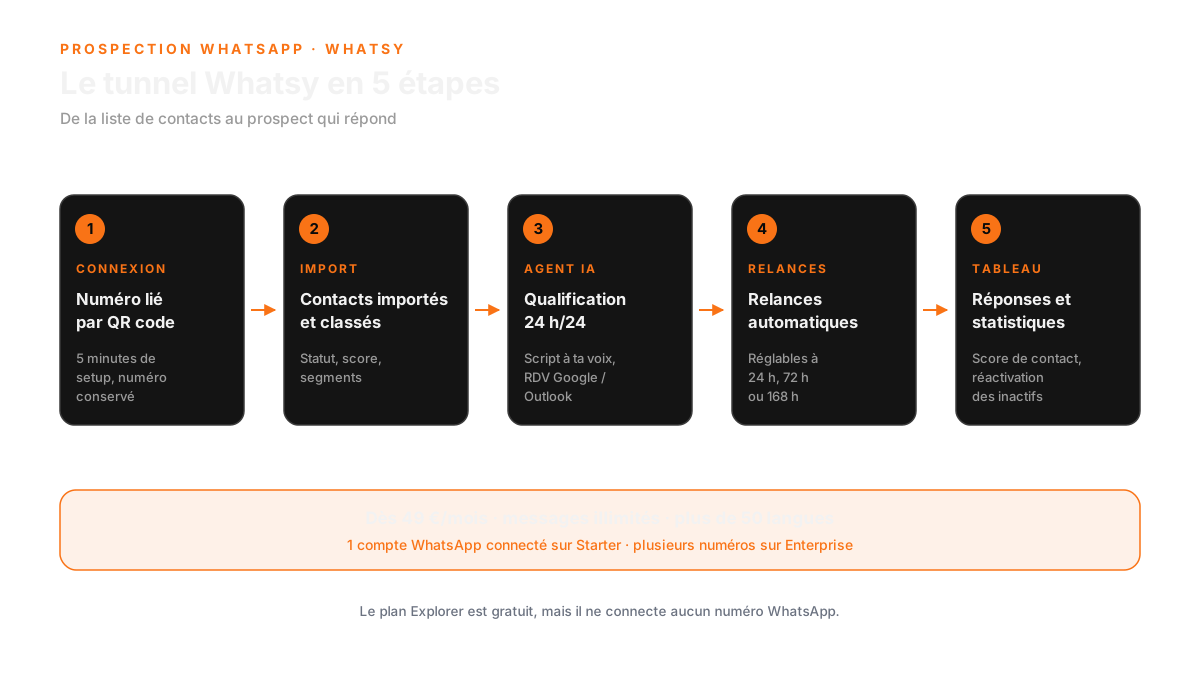
4. Launch campaigns and automatic follow-ups
Campaigns go out by segment, with automatic follow-ups at configurable intervals (24h, 72h, 168h by default in the interface). The prospect does not reply, the follow-up goes out. He replies, the follow-up stops.
Tip: set three follow-ups maximum for a first contact. Beyond that you are not following up anymore, you are sending a breakup message. Whatsy's scoring shows you who deserves one more effort and who is dead.
5. Read your dashboard and answer like a human
The dashboard shows total contacts, messages sent, replies, qualified prospects, bookings, active conversations and replies received in under an hour.
Tip: the number that really matters is replies under one hour. A prospect who gets a human answer within the hour is in a completely different state of mind from one who waits 18 hours. The agent handles the night, you take back the hot replies.
Your typical week with Whatsy
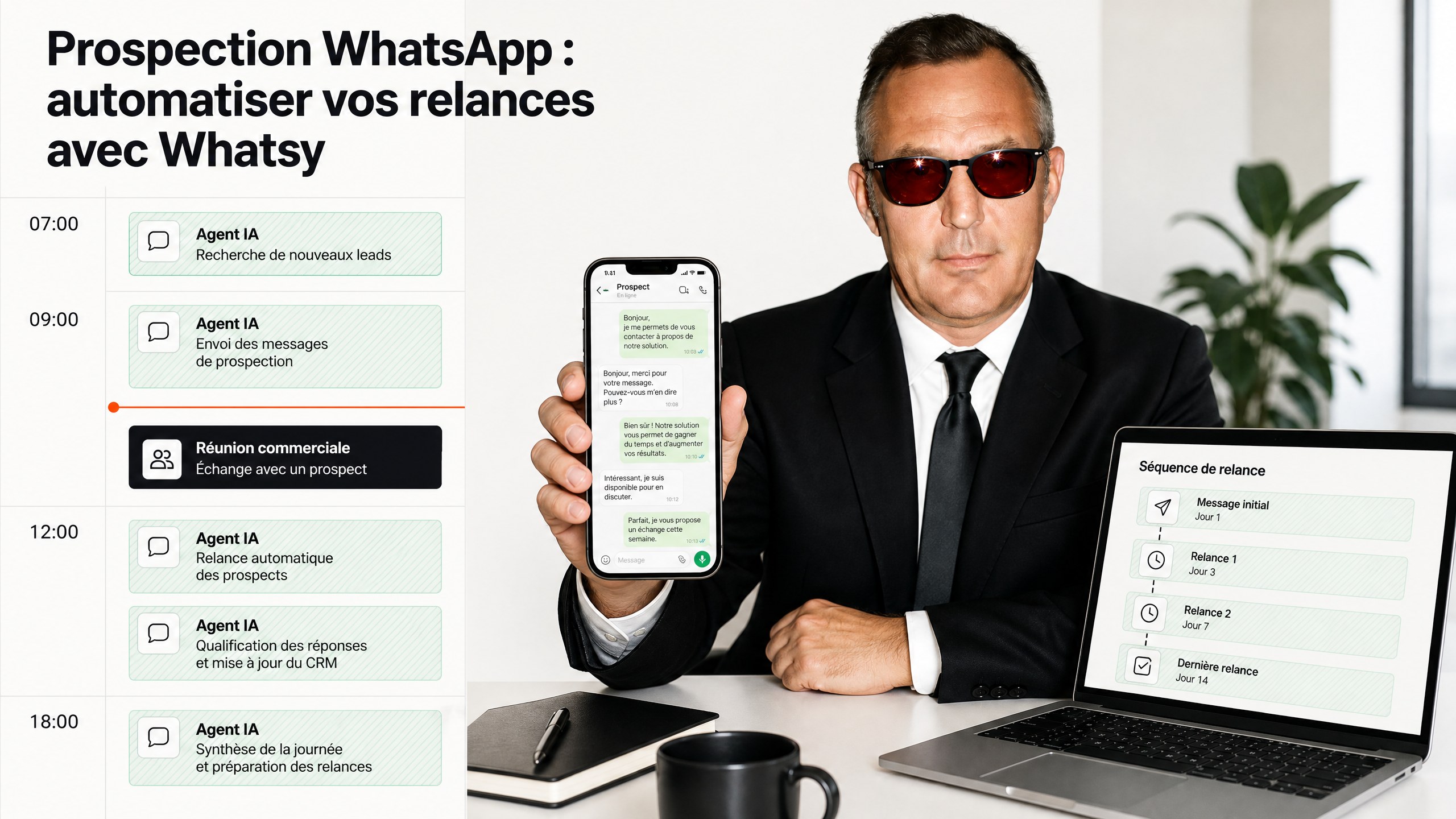
To make it concrete, here is the actual rhythm of a Starter account once the funnel is in place.
Monday morning, 20 minutes. You import the week's new contacts (trade shows, forms, referrals), set their status, launch the campaign for segment A. Then you leave it alone.
All week, nights included. The agent answers new messages, asks the qualifying questions, files the answers in the CRM and proposes slots in your calendar. A prospect writing at 10 PM does not go back to the waiting list.
Tuesday and Thursday, 15 minutes each. You open the conversations the agent flagged as hot, take back control where a human decision is needed, confirm the bookings. That is where the time is saved, not by removing human contact, but by reserving it for what deserves it.
Friday, 10 minutes. You look at the two numbers that matter: replies received within the hour and confirmed bookings. The rest is decoration.
The total budget is about one hour of human work per week for roughly a hundred activated contacts. Whatsy's claims mention over 100 hours saved per month; personally I have never seen that figure on my accounts, what I can confirm fits in one sentence: the evenings lost answering the phone are gone.
What changes is not the volume of messages you send. It is how many Sundays you spend wondering who never replied.
What Whatsy does, and what it does not
The credibility of a tool is also judged by what it refuses to do. Here is the honest version.
| What Whatsy does | What Whatsy does not do |
|---|---|
| Answers and qualifies prospects 24/7 with an AI agent | LinkedIn prospecting, cold email or phone calls |
| Books meetings in Google Calendar and Outlook | Send SMS or email follow-ups |
| Automatic follow-ups at configurable intervals (24, 72, 168h) | Run without a WhatsApp connection: the free plan connects none |
| Contact scoring, reactivation of inactive prospects, enrichment | Manage several WhatsApp numbers on the Starter plan (one account only) |
| Unlimited messages, 50+ languages, statistics dashboard | Serve as a multi-team enterprise CRM: this is a prospecting CRM |
| QR code connection, number kept, 5 minute setup | Replace a multichannel support inbox (email, chat, phone) |
What Whatsy is: a machine that turns WhatsApp numbers into meetings. What it is not: a helpdesk, nor a LinkedIn acquisition channel.
The 3 traps that kill a WhatsApp prospecting effort
Before the pricing, three ways to botch the launch. I have seen all three at different clients this year, and every time the tool took the blame.
1. Importing a list with no status
You export 400 rows from a spreadsheet, dump them into the tool, hit send. Result: long-time customers get a first-contact message, prospects lost two years ago wake up thinking you are harassing them, and your hot leads drown in the flow.
Status comes before the campaign. Always. One hour of sorting beats three months of cleanup.
2. An agent script written like a brochure
The classic AI trap: you write what you would love to hear in your place, not what the prospect wants to hear. The agent becomes a miniature offshore call center, and the prospect spots it within the first three seconds.
The fix fits in one sentence: write like you write in a private message, with your informal tone, short questions, imperfect phrasing. If you sell addressing people formally, keep it formal. The agent must not sound better than you, it must sound like you, except it answers at 3 AM.
3. Follow-ups with no counter
Automatic follow-ups without a limit are spam automation. A prospect who does not reply after three messages does not want a fourth, he wants you to stop. Whatsy cuts follow-ups as soon as a reply arrives, and the scoring tells you who still deserves an attempt.
The rule I use: three follow-ups, then a breakup message that offers the exit ("I'll leave you alone, tell me if it comes back"). The best replies of my career came from that one.
A fourth trap exists, and it is not technical: sending before you have an offer worth a call. An AI agent on a fuzzy offer accelerates decline, not growth. That is exactly why the offer gets worked on before the tool.
Whatsy pricing (checked on October 8, 2026)
Four levels, no surprises hidden in the footer.
| Plan | Price | What you get |
|---|---|---|
| Explorer | Free | Full interface, agent configuration, read-only CRM. No WhatsApp connection. |
| Starter | 49 EUR/month | 1 connected WhatsApp account, unlimited messages, qualification, booking, follow-ups, scoring, reactivation, Google/Outlook calendar, 50 contacts max. |
| Growth | 149 EUR/agent/month | 250 contacts max, priority support, everything in Starter. |
| Enterprise | Custom | Several WhatsApp accounts, for agencies. |
Two divergences worth knowing, because I hate surprises: the pricing card shows 50 contacts on Starter, the payment system shows 100. And a Premium plan at 399 EUR/month exists in the payment system but does not appear on the pricing page. If you want certainty, check at signup.
At 49 EUR a month the math is quick: a single signed deal pays back years of subscription. The Whatsy landing page even calls the tool "paid for within the first week".
FAQ: WhatsApp prospecting with Whatsy
How does Whatsy improve response times for my team?
Whatsy automates responses through an AI agent that operates 24/7, qualifying prospects and booking meetings directly into your calendar. This reduces manual follow-ups and ensures prospects receive timely replies, enhancing your chances of conversion.
What kind of results can I expect from using Whatsy?
Users of Whatsy have reported a 30% increase in conversion rates, 10 times more qualified appointments, and significant time savings—over 100 hours per month. Additionally, there's a noted 47% increase in confirmed bookings and a 60% decrease in no-shows.
Do I need to change my WhatsApp number to use Whatsy?
No, you can connect your existing WhatsApp number using a QR code. This allows you to keep your contacts and avoid the hassle of migrating to a new number.
The channel is open. Your move.
None of this works if your list is poorly prepared or your offer is fuzzy. That is where most people wreck their tool and conclude that "AI does not work".
If you want to look at your case together, start with our free audit: 45 minutes to identify your three acquisition bottlenecks, with or without Whatsy behind it.
Then the product itself: whatsy.fr, free Explorer plan, number connected by QR code.
And if you are looking for other pieces to add to your sales machine, everything else is in our lab.
WhatsApp will not wait for your calendar. It is waiting for your answer.