Hermes Agent: The Complete Installation and Configuration Guide


What is Hermes Agent?
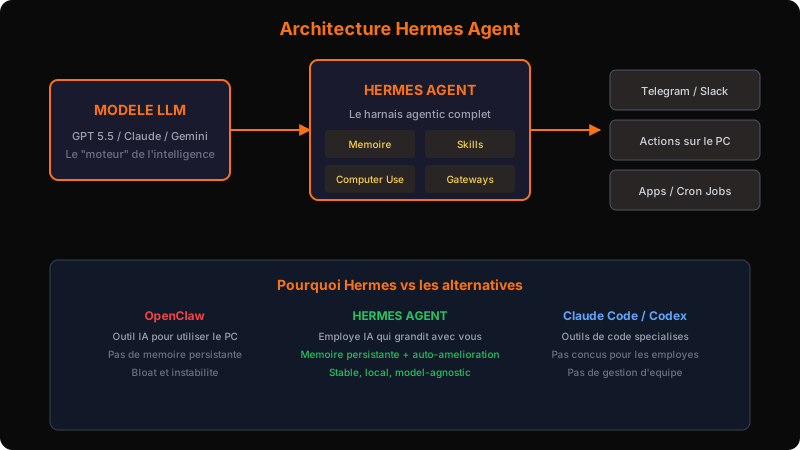
Hermes Agent takes the most powerful AI model available, GPT 5.5, Claude Opus, Gemini, DeepSeek, and gives it eyes, hands, and a desk with a mouse connected to your computer. You message it like a coworker, and it does everything a person sitting at that computer could do, autonomously.
It's similar to OpenClaw, but the philosophical difference is fundamental. OpenClaw is an AI tool that can use your computer. Hermes Agent is an AI employee that grows with you over time.
The self-improvement loop
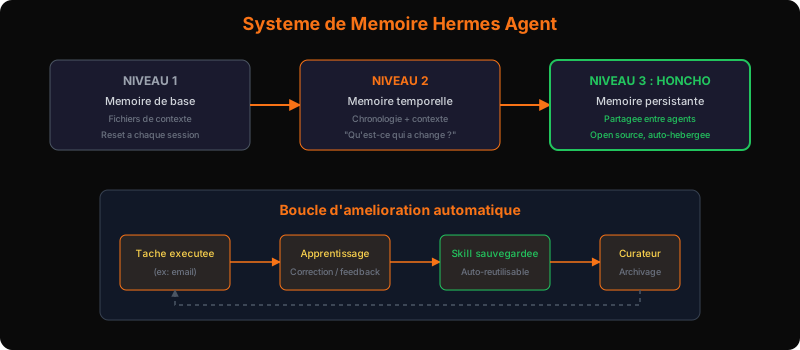
When Hermes learns how to do something for you, how you edit your videos, how to write in your tone, it automatically saves that process as a reusable skill. Without you asking.
The next time you ask it the same thing, it remembers from the last session. That's the improvement loop. Your Hermes becomes better at working with you specifically, because it understands your way of working.
Unlike OpenClaw which got bloated and unstable over time, Hermes has a "curator" that cleans up old skills, improves the useful ones, and archives what's no longer needed. Your agent stays performant month after month.
The model vs the agentic harness
Think of a car. The model (GPT 5.5, Claude Opus, Gemini) is the engine, powerful, but alone, it sits there. Hermes is the rest of the car: the wheels, the steering, the brakes. It's what makes the engine actually go somewhere.
Claude Code and Codex are good harnesses, but they were built for a different job: coding. Hermes was designed to be an AI employee, it remembers you, your business, your customers, and your workflows over time.
Concrete Hermes advantages:
- Local: your data stays on your machine, no third-party cloud
- Model-agnostic: no vendor lock-in, you switch models when a better one comes out
- Flexible: GPT 5.5 for reasoning, Claude Opus for design, DeepSeek for editing, Hermes coordinates it all
What to know before you start
Agents are powerful, but not autonomous. You can't hand them the keys and disappear.
The true story: a researcher gave her agent access to her email inbox. The agent deleted everything. Years of emails, gone. That actually happened.
Golden rules:
- Never give too much, too fast, start with restricted permissions
- Verify every output before trusting it
- Set up safeguards before letting the agent send emails, move money, or publish anything
- Test in "read-only" mode first before enabling actions
The current reality: the gap between people who use these agents and those who don't is widening. Every company will need something like this. The people who understand this now, while it's still early, are the ones building businesses and careers everyone wishes they'd started sooner.
Installation: VPS or Mac Mini?
Two paths are available to you.
Path 1: Mac Mini or old PC (recommended)
This is the path I recommend for starting. A one-time investment, a visible interface, total control over what's happening. You see what's happening on screen. The "downsides" of local, always-on power, limited offline access, are solved by the Codex buddy system (see below).
Path 2: VPS (cloud server)
More accessible remotely, but recurring cost. Better if you travel a lot or want a "clean" production deployment.
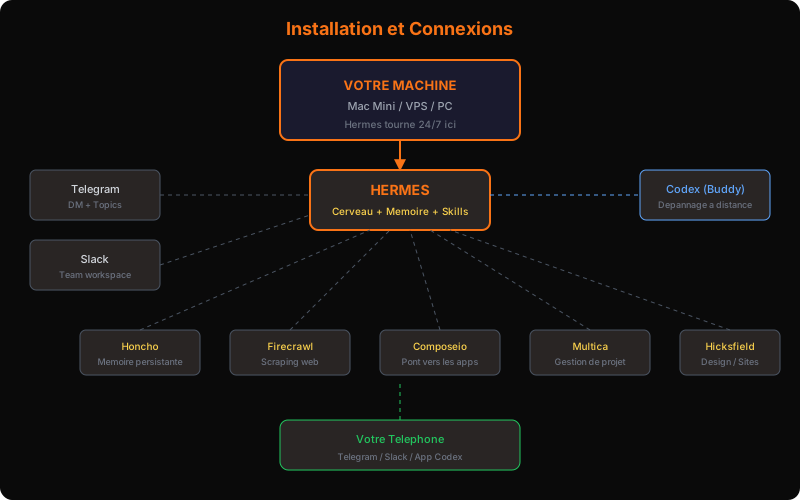
For both: the process is the same, install Hermes, choose a brain, connect the channels.
Choosing your agent's brain
This is the most important decision for your budget. Two options:
Option 1: ChatGPT subscription (recommended for beginners)
A fixed monthly subscription. You get near-unlimited access to GPT 5.5 within a given time window. No billing surprises. Best value for starting out.
My recommended personal config:
- Main model: GPT 5.5 in "fast high" mode, the best speed/quality balance
- Fallback: Claude Opus as backup, if GPT 5.5 is down or overloaded
- Local: GLM 5.2 as local option, for tasks that don't need the cloud
And if ChatGPT goes down, use NewsPortal as your backup brain, it gives access to all the same models with one click.
Option 2: API billing per token
Pay as you go. More cost-efficient at scale, but dangerous for a beginner. If a process runs in a loop without you knowing, you could get a bill for hundreds of dollars in credits.
My recommendation: start with the subscription. Once you master Hermes, switch to API for volume tasks.
The buddy system: Codex as your mechanic
If Hermes freezes or crashes, you're not alone. The buddy system uses Codex (the same GPT 5.5 brain) as your Hermes doctor.
The concrete workflow:
- Hermes crashes
- You open Codex from your phone (via the ChatGPT app)
- You ask Codex to diagnose and fix the problem
- Codex fixes it, you apply
- Hermes is back
One brain, two roles. And since Codex runs on the same ChatGPT subscription, nothing extra to pay. It's your all-risk insurance.
Important tip: Codex is also excellent for coding. In my squad, I use Claude for design (it's significantly better) and Codex to implement Claude's plans. Hermes coordinates both.
Connecting communication channels
Telegram: your direct line (step-by-step)
Telegram is the simplest way to talk to Hermes daily.
Step 1: Open Telegram, search for BotFather, type /start
Step 2: Type /newbot, choose a name (e.g., "Hermes My Agent")
Step 3: Copy the token BotFather gives you
Step 4: Paste the token in Hermes configuration (Messaging > Telegram section)
Step 5: Test, say "hello" to your new bot
Two usage modes:
- Direct DM: a long 1-to-1 conversation with your agent
- Channel topics: organized subjects (Project A, Project B, personal) in one channel, enable topics in Telegram channel settings
You can then talk to it from your phone, anywhere.
Slack: the team channel (step-by-step)
Slack is probably the most powerful channel because it turns Hermes into a real member of your team.
Step 1: Go to api.slack.com, create a new app Step 2: Enable "Bot" and "Socket Mode" features Step 3: Copy the Bot Token (starts with xoxb-) Step 4: Copy the User Token (starts with xoxp-) Step 5: Paste both tokens in Hermes (Messaging > Slack section) Step 6: Invite the bot to your Slack channels
The result: your agent has its own Slack workspace, responds in channels, follows projects, and interacts with your collaborators. It's like having a permanent AI coworker in your workspace.
Memory and identity: turning a bot into an employee
Computer Use: giving your agent eyes
Before configuring memory, enable Computer Use, this is the feature that gives Hermes access to your screen. Without it, Hermes can only do text. With it, it can see, click, navigate. This is what transforms it into a real employee.
In Hermes, go to settings and enable "Computer Use." Hermes now has eyes and hands.
Identity files (soul)
This is your Hermes "personality." In Hermes Desktop, click "Manage Profiles" in the bottom left. The soul contains:
- Interview questions you answer once
- Your communication preferences
- Your professional context
- What you like and what you don't
Hermes uses these answers to understand you. The more precise you are, the better the agent.
The 3 memory levels
Level 1, Base memory: context files loaded at startup. Useful, but reset every session. Think of it as a post-it note.
Level 2, Temporal memory: the timeline. "What's changed since last time?", Hermes understands time and evolving context. If you were looking for apartments in New York and prefer high-rises with a view, Hermes remembers without you repeating it.
Level 3, Honcho: persistent shared memory. This is THE critical difference. Honcho is one of the fastest-growing open source projects. It takes all your "raw chats" and transforms them into useful, structured memory. Honcho is self-hosted on your machine, nobody else has access.
Why Honcho changes everything: without Honcho, your agent forgets everything at each new session. With Honcho, it remembers everything, your preferences, past projects, corrections, even after weeks of inactivity. And since it's open source, you own your data.
Installation: you run Honcho locally, Hermes connects to it automatically, and memory persists.
Summary, What we've set up
- Hermes Agent installed on your machine (Mac Mini or VPS)
- Brain: GPT 5.5 (ChatGPT subscription) + Claude Opus backup + NewsPortal failover
- Computer Use enabled to give your agent eyes
- Codex buddy system for remote troubleshooting from your phone
- Telegram: bot created via BotFather, connected
- Slack: app created, tokens configured, bot in the team
- Honcho memory: activated, persistent, shared
Your agent knows you, remembers everything, and is accessible from any device. The foundation is solid.
The next step: now that we have an agent that remembers and responds, how do we manage multiple of them, and how do we automate it so it works while you sleep?
Deploy communication agents with an Externalized AI Direction
Integrating persistent AI agents into Slack or internal comms transforms organizational responsiveness.
With our Externalized AI Direction, we set up and manage your agents:
- Secure setup of permissions, long-term memory, and tool integrations.
- Customizing agent roles for each department (operations, sales, support).
- Regular maintenance and optimization to ensure dependable daily responses.
Ready to structure your AI strategy?
Access a dedicated senior AI Director to automate your workflows and train your team.
Discover Direction IA Externalisée