Best LinkedIn CRM: 5 tools compared in 2026
 Gary Bramnik
20 October 2026 · 11 min read
Contents
- The 5 criteria that actually decide
- The entry-price trap
- SalesQL: the address book that is not a CRM
- Evaboot: the best entry price, billed in credits
- PhantomBuster: the toolbox, not the house
- Waalaxy: the closest competitor on price
- Relnk: the one we built because we could not find it
- The 10-second table
- The honest verdict
- FAQ: LinkedIn CRM tools comparison
- The last word
Five tools claim to "manage your LinkedIn network". None of them does the same job. Two are there to harvest contact details, one is there to break through your automation limits, one sells cold prospecting. The fifth one is ours. So why do we keep calling all five a CRM?
The question lands in my inbox at least twice a week: "what is the best LinkedIn CRM?" My answer fits in one line. It depends on what you want to do with your network. And when in doubt, price ends up deciding, because nobody has criteria.
So let us set the criteria first. Prices come after.
The 5 criteria that actually decide
1. Are you reactivating or collecting? A tool can extract hundreds of profiles a month. If none of them knows you, you have filled an expensive spreadsheet. The first question is whether the tool works on the network you already have, or on strangers.
2. Who hits "send"? A message either goes out automatically or after your approval. You see the difference on your LinkedIn account six months later, and on your reply rate the week after.
3. Do you end up with a CRM or with a list? A visual pipeline, a heat score, a history of exchanges: that is one thing. A CSV export of contacts is another. Both are useful, they just are not the same job.
4. What does it really cost? The entry price tells you nothing. What matters is what you pay once you take off, and whether the next tier is priced in credits, seats or flat euros.
5. How long has it been running? A proven tool has already absorbed LinkedIn's updates on your behalf. A younger one has other qualities, but you should know that before signing.
Prices taken from official pages on 8 October 2026. No affiliate links below, and one of the five is ours.
The entry-price trap
Scoop: the cheapest tool in this comparison is not the one that will cost you the least.
A $9 a month subscription ends up costing more than a EUR 49 plan the moment you push past a few hundred credits. Likewise, a EUR 19 seat multiplied by five colleagues quickly beats a flat fee. The real question is not "how does it start", it is "what does it cost when it works".
Three questions before you get your card out. Does the price scale with credits, with seats, or not at all? Can I change tier without calling a salesperson? Does the entry price include the feature I chose this tool for?
If the answer to the third question is no, you are paying for software you will have to complete with a second piece of software. The real price of the stack is the sum of the two.
SalesQL: the address book that is not a CRM
SalesQL does one thing: pull contact details (emails, phone numbers) for the LinkedIn profiles you target, then export them. It is a mature data extractor with a free version to test and paid tiers when you want volume.
The entry price is clear. The free plan costs $0, Basic $39 a month ($29.25 billed annually), then $79 for Professional and $119 for Premium, with $5 per additional seat. The model is simple: you pay for data.
Where it falls down is the other criteria. SalesQL does not follow up, does not score, does not pipeline anything. You come out with a list, and building everything around it is on you. For a salesperson who already has a network and wants to reactivate it, this is a detour that costs you a month.
Strength: depth of data and a free way in. Weakness: zero follow-up, zero CRM, everything gets rebuilt elsewhere.
Evaboot: the best entry price, billed in credits
Evaboot plays on the same ground as SalesQL, with a focus on extraction from Sales Navigator plus email verification. Its strength is the entry point: $9 a month for 100 credits. In this comparison, it is the cheapest.
After that, the bill climbs in credits: $29 for 500, $49 for 1,500, $99 for 4,000, $299 for 20,000, with a slider that reaches $1,699 a month. Annual billing equals ten monthly payments, so two months free. The model is honest while you stay small, and unpredictable the moment you push.
Like SalesQL, Evaboot does not do follow-ups or pipelines. And credits are the worst possible metric for planning: you never know how many contacts you will be allowed to extract on the 20th of the month.
Strength: $9 to try it, a transparent price scale. Weakness: everything is billed in credits, and the core of the job (following up, tracking) is not there.
PhantomBuster: the toolbox, not the house
PhantomBuster is not a CRM, it is a cloud of robots. You configure "Phantoms" that scrape, invite, message and collect data, then chain them together to build your own system.
The Start plan begins at $69 a month ($56 annually), Grow at $159, Scale at $439. A free plan exists after the 14-day trial, limited to 30 minutes of processing per month, which is barely enough to watch a demo run.
The versatility is real: if you want to automate anything on LinkedIn, there is probably a Phantom for it. The flip side is equally real. You are the engineer: you configure the delays, the volumes, the sending windows, and you carry the risk when an outbound run goes wrong. A visual pipeline with a heat score is something you build yourself, or you do not build it.
Strength: volume and freedom to automate. Weakness: everything is hand-assembled, the guardrails are your problem, and there is no ready-made pipeline.
Waalaxy: the closest competitor on price
Waalaxy is the French prospecting tool for LinkedIn and email: invitations, sequences, contact tracking, an interface designed for independents. It is the one that most resembles a consumer product in this list.
The Pro plan starts at EUR 19 per user per month, Advanced at EUR 49, Business at EUR 69. Quarterly billing gives 20 % off, annual 50 %. At EUR 19 it comes in under Relnk's EUR 24, and it is the only competitor to do so in euros.
The nuance sits in criterion 1. Waalaxy is built to contact prospects you have just targeted, with sequences that run on their own. You can use it to follow up with your network, but its first mechanic is outreach toward strangers. The built-in CRM stays basic: contacts and statuses, no heat score, no deal pipeline.
Strength: entry price in euros and simple onboarding. Weakness: designed for cold prospecting, with a deliberately minimal CRM.
Relnk: the one we built because we could not find it
Relnk is ours (AI French Touch, one of the five had to be). We built it because none of those four options answered the question we were asking: what do we do with the network we already have?
The angle is on purpose. Relnk does not go looking for strangers. It extracts your LinkedIn conversations, unifies them with your email in one inbox, assigns a heat score (Cold, Lukewarm, Hot, In negotiation), gives you the "who to follow up with today" queue, and drafts personalised follow-ups that never leave without your approval. The guardrails are built in: an 8 a.m. to 6 p.m. sending window, random delays of 4 to 10 minutes, a variable daily volume, and an automatic pause as soon as a prospect replies. All of it with a column-based deal pipeline and email plus phone enrichment.
Pricing: Extractor at EUR 24 a month (extraction, history, CSV export, 100 conversations per day), and the Complete CRM at EUR 49 a month in private beta instead of EUR 99, locked for life for the first members. Beta access is reviewed by hand.
The limits are just as clear. The product is young and still in beta, with access on request. Extraction caps at 100 conversations a day. And it has neither the data depth of SalesQL nor the automation ecosystem of PhantomBuster. On maturity, it loses.
Strength: reactivating an existing network, human-validated follow-ups, a full CRM in one tool. Weakness: younger product, closed beta, limited extraction volume.
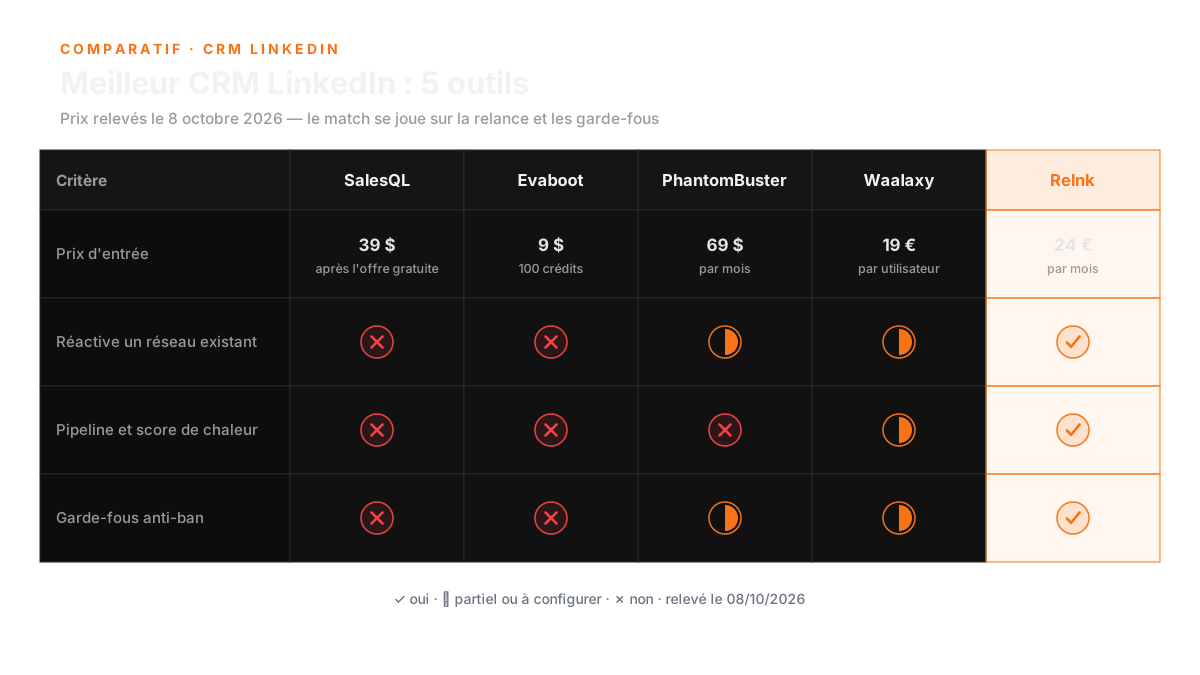
The 10-second table
| Criterion | SalesQL | Evaboot | PhantomBuster | Waalaxy | Relnk |
|---|---|---|---|---|---|
| Entry price (08/10/2026) | free, then $39/mo | $9/mo | $69/mo | EUR 19/user/mo | EUR 24/mo |
| Top tier | $119/mo | up to $1,699/mo | $439/mo | EUR 69/user/mo | EUR 49/mo in beta |
| Reactivates an existing network | no | no | needs building | partial | yes |
| Human-validated sending | n/a | n/a | up to you | partial | yes |
| Pipeline and heat score | no | no | no | basic | yes |
| Anti-ban guardrails included | n/a | n/a | up to you | partial | yes |
| Extraction volume | high | high, metered | very high | medium | 100 conversations/day |
| Maturity | proven | proven | proven | proven | beta |
How to read it: prices come from official pages, the rest is my reading of each tool's public positioning. "N/A" means the criterion does not apply to a data extractor.
The honest verdict
On criteria 1, 2 and 3, Relnk wins, and it is not even close. It is the only one that works directly on your existing network, the only one that blocks a send until you click approve, and the only one of the five that ships a real pipeline with a heat score. The others hand you contacts or automations, not a follow-up CRM.
On criterion 4, we tie. Waalaxy starts at EUR 19 against Relnk's EUR 24: same bracket, and no independent changes their mind over EUR 5. That said, Evaboot at $9 stays the cheapest of the five, and on a tight budget it takes that round.
On criterion 5, we lose. SalesQL, Evaboot and PhantomBuster have been running for years and have absorbed LinkedIn's updates on behalf of their users. Relnk is in beta with manually reviewed access. If your priority is maturity and integrations, take PhantomBuster. If your priority is squeezing out as many contact details as possible, take Evaboot or SalesQL.
We built ours because we could not find anything answering a very common situation: a network of 1,000 contacts, 150 started conversations, and no method for knowing who to follow up. The other four answer "how do I find new prospects". Relnk answers "what do I do with the ones I already have". Those are two different questions, and that is why the comparison is worth making.
FAQ: LinkedIn CRM tools comparison
What should I consider when choosing a LinkedIn CRM tool?
You should evaluate your specific needs, such as whether you're reactivating your existing network or collecting new contacts. Consider who sends messages, the type of data output you need, pricing structures, and the tool's maturity in handling LinkedIn updates.
Why is the entry price not the most important factor?
The entry price can be misleading. It's essential to understand what the tool will cost as you scale up usage, whether it's based on credits or seats, and if it includes the features you need. Often, the total cost can exceed initial expectations.
What are the strengths and weaknesses of SalesQL?
SalesQL excels in providing detailed contact data with a straightforward pricing model. However, it lacks follow-up capabilities and CRM features, requiring users to build additional systems for those functions.
The last word
The best LinkedIn CRM is the one you open every morning. A tool you never look at, even a great one, costs more than an average tool you actually use.
Before you choose, get clear on your process: the free 45-minute audit goes through your network, your follow-ups and your habits, and you leave with a written plan. It is right here: book your free audit.
Relnk lives on relnk.fr. And if your answer to "what do I do with my network" turns out to be a different question (an agent, a workflow, training), we built other doors in our lab.
A CRM does not create pipeline. It just forces you to look at the one you already have.